Browsing Stream Baselines
You can browse the stream baseline as follows.
1. Click the Streams tab to open the Streams Listing page. The Streams Listing page displays a list of all the available streams.
2. Click the name of the desired stream and select the Stream Baselines sub-tab.
Alternatively, click the ellipsis menu next to the Streams tab and select View Stream Baselines. The Stream Baselines (Stream Name) sub-tab opens, displaying all the stream baselines for the selected stream. Click the baseline name link to browse the stream baseline. A Select Project to Browse Baseline dialog box opens.
3. In the dialog box, select Project for browsing the selected stream baseline.
4. Click Browse Using Selected Project.
5. A Wiki page of the selected project opens.
When Viewing in Project-Context
When you are viewing a stream baseline in a project-context, you can see the stream and stream baseline name in the global header as shown in the image.
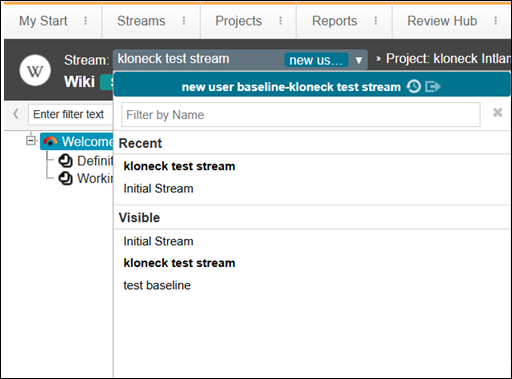
When you click the stream name, a drop-down appears.
In the drop down, you can see the following:
• Stream Baseline Name—Stream Name
•  Switch to Another Baseline—Opens the Baselines and Branches dialog box. Select the required baseline.
Switch to Another Baseline—Opens the Baselines and Branches dialog box. Select the required baseline.•  Switch to HEAD—The most recent version of the stream baseline opens.
Switch to HEAD—The most recent version of the stream baseline opens.