Bookmark Blocks
When you are exporting a multi value field, such as a choice list, using only merge fields is not enough. A loop must be defined in the template by adding bookmarks.
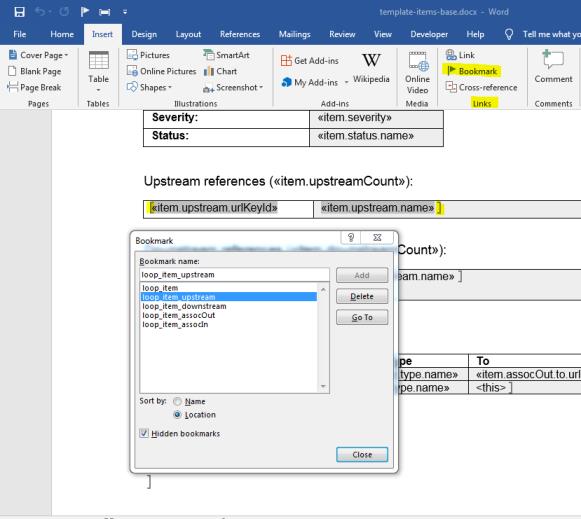
When you are editing the template in Word, select > > on the ribbon. This will open a small window where you can view and manage existing bookmarks in the document.
By entering a name and clicking Add, you can create a new bookmark on the current selection. In the next example, the bookmark loop_item_upstream is created on the table row, which is selected.
By selecting some of the document and creating a bookmark for it, you are defining which part of document should be the body of the respective loop.
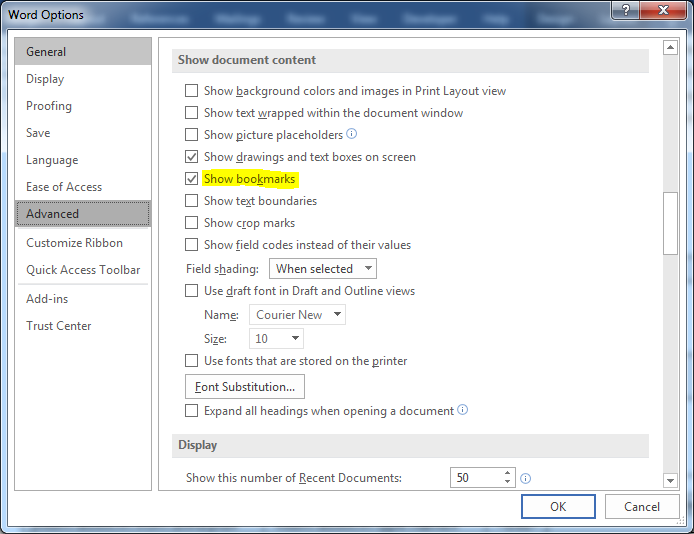
Squared brackets show the beginning and end of the bookmarked block. This is not visible by default. To turn it on, go to > > > > .
The name of bookmark blocks must match the respective merge field names. If you define a custom field with a label, Related Bugs, then the Merge field name is item.relatedBugs.name and the Bookmark name is loop_item_relatedBugs.
 |
For custom choice lists, only "id," "name," and "urlName" merge fields are available
|
If the bookmark starts outside a table, then included paragraphs and tables will be looped (referred to as paragraph loop).When copying content that includes bookmarks, then bookmarks will not be copied because of duplication. Bookmark names have to be unique in the document. The user has to create a new bookmark by altering the name of the original bookmark.
When using the same loop multiple times in a document, the user has to add some postfix to alter the name of bookmark.
 For example, loop_item_downstream2, loop_item_downstreamPostfix. Underscore is used to determine levels, so it cannot be used in the postfix. For example, loop_item_downstream_postfix => will not work In a loop_item_downstream, you can only refer to the array item. downstream. When referring to another array, you must specify loops for each of them respectively
For example, referring to item.upstream.name inside loop_item_ downstream will result in error.
The following are limitations:
• Loops in tables:
◦ Only loops the first row inside bookmark.
◦ Single cell cannot be repeated only the whole row.
• Loops outside tables:
◦ When a user wants to create a paragraph loop starting with a table, then the bookmark must start in a line before the table (not in the same line). Otherwise it will be detected as a table row loop.
◦ If a paragraph loop is followed by a table, then there must be an empty new line between the end of the bookmark and the table.