Accessing Custom or Customized Fields by Their Labels
Some fields such as name, ID and Description are available in all trackers, making it easy to access their values using the ${items.description} expression.
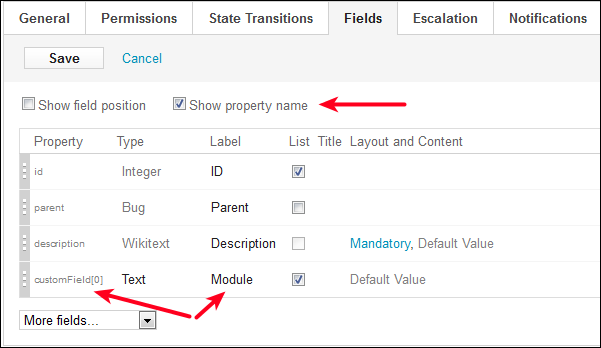
Custom fields, however, are more difficult to access. In the following image, a custom field named Module is defined in the tracker and is stored in the customField(0) property. This is visible only when the Show property name checkbox is selected. Therefore, the ${items.getCustomField(0)} expression could be used in the Excel template to access the value of Module, but this limits the reusability of the template in the scenario where the Module field is stored in different physical properties in different trackers.
For this reason, it is better to access fields using their label as the expression. For example, using ${fields.getByLabel(items,"Module")} finds the field that has a label of Module on an item, and returns the field's value. This makes reusing templates much easier.