Testing Active Directory Connection
This topic contains a tutorial that explains how to test LDAP connection configuration with Windows Active Directory using mostly default settings.
Environment Assumptions
• Internal domain name: yourcompany.local.
• Domain controller server name: server.yourcompany.local.
• LDAP port: 389 (default).
• The Codebeamer server can resolve the host address server.yourcompany.local This can be verified, by ping command: ping server.yourcompany.local.
Steps to follow
1. In your active directory, create a new organizational unit, for example CBTEST.
2. In the CBTEST organizational unit, create a new account: cbuser.
3. If you are using an earlier Windows version, before Windows 2000, your user logon name looks like: yourcompany\cbuser. And for Windows 2000 or later, your user logon name looks like: [email protected]. First/Last name is optional but still appears in the verification.
4. Clear the User must change password at next logon option.
5. Verify that cbuser can login to your domain. For example, login from a workstation with its credentials.
6. Go to User Authentication under System Administration.
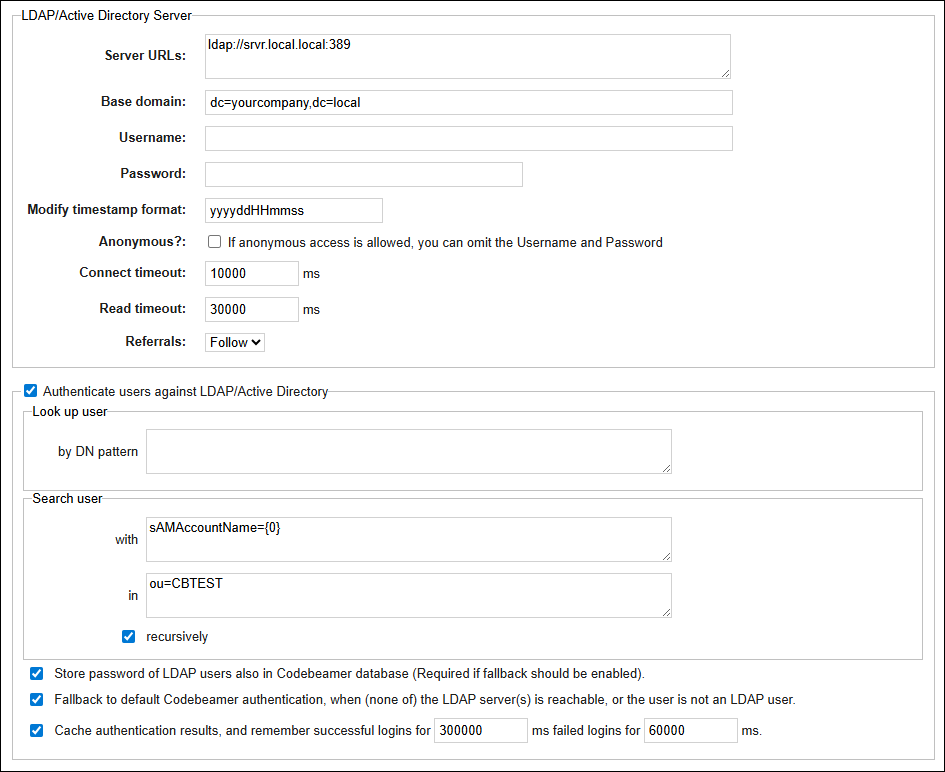
7. Enter the following configuration settings:
◦ LDAP/Active Directory Server section.
Server URL(s): ldap://srvr.local.local:389.
Base domain: dc=yourcompany,dc=local.
Username: administrator (a user with proper LDAP access).
Password: (administrator password).
◦ Search user section in: ou=CBTEST .
◦ Leave other entries as default.
8. Under the Test authentication against LDAP/Active Directory section:
a. Enter cbuser and password.
b. Select Test.
c. If the test is successful, a message is displayed. A new column appears in the right side panel with the header Response from LDAP which lists the returned attributes, for example, first/last name.
Common Error Messages
|
Error Message
|
Cause
|
|---|---|
|
You must change your password before you can log in.
|
Steps 2 and 3 were not done correctly.
|
|
Please enter your password.
|
No password specified for test user cbuser.
|
|
The entered username is invalid.
|
Incorrect username or search conditions.
|
|
LDAP/Active Directory authentication failed: Failed to borrow DirContext from pool.; nested exception is java.util.NoSuchElementException: Could not create a validated object, cause: ValidateObject failed.
|
Base domain incorrect or missing admin password.
|
|
LDAP/Active Directory authentication failed: Failed to borrow DirContext from pool.; nested exception is org.springframework.ldap.AuthenticationException: [LDAP: error code 49 - 80090308: LdapErr: DSID-0C0903C5, comment: AcceptSecurityContext error, data 52e, v23f0]; nested exception is javax.naming.AuthenticationException: [LDAP: error code 49 - 80090308: LdapErr: DSID-0C0903C5, comment: AcceptSecurityContext error, data 52e, v23f0]
|
Incorrect admin username/password or server connection.
|
|
LDAP/Active Directory authentication failed: Failed to borrow DirContext from pool.; nested exception is org.springframework.ldap.CommunicationException: srvrx.local.local:389; nested exception is javax.naming.CommunicationException: server.yourcompany.local:389 [Root exception is java.net.UnknownHostException: server.yourcompany.local]
|
Server name incorrect or cannot be resolved.
|