Converting HTML Table Data to Table Field
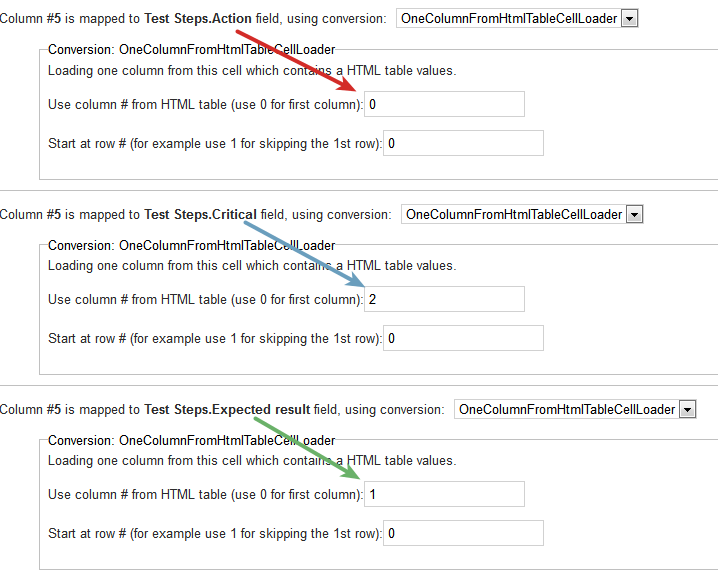
After the HTML table is mapped to the Table field on the next wizard page we need to configure which part of the HTML table goes to which field. This is done by selecting the OneColumnFromHtmlTableCellLoader converter. This converter extracts one column from the HTML table, and puts it to one column to the Test Step table cell.
For example if this is the HTML table in our Excel cell:
|
Action
|
Expected Result
|
Critical
|
|---|---|---|
|
fill up the tank
|
check if it's full %
|
false
|
|
go to driving range and reset odometer
|
it shows 0km
|
false
|
|
start driving and drive until fuel is out
|
car stopped
|
false
|
Then you want to extract the 0th column (red) and map to the Action field, extract the 1st column (green) and map to Expected field, extract the 2nd column (blue) and map to Critical field. This extraction is configured as the following screenshot illustrates (config is indicated by the matching color):