Custom Fields Example
Finding the field ID
Use the following endpoint to find the fieldIds.
URL
GET /v3/trackers/{trackerId}/fields
Response Body Example
[
  ...
  {
    "id": 1001,
    "name": "User custom choice",
    "type": "FieldReference",
    "trackerId": 4309
  },
  ...
  {
    "id": 10003,
    "name": "Reusable",
    "type": "FieldReference",
    "trackerId": 4309
  },
  ...
  {
    "id": 1000000,
    "name": "Test Steps",
    "type": "FieldReference",
    "trackerId": 4309
  }
]
Custom Basic Fields
1. To get the information about reusable field use the following endpoint.
URL
GET /v3/trackers/{trackerId}/fields/10003
Response Body Example
{
  "id": 10003,
  "name": "Reusable",
  "type": "BoolField",
  "hidden": false,
  "valueModel": "BoolFieldValue",
  "mandatoryInStatuses": [ ... ]
}
2. The valueModel of this field is BoolFieldValue. To set the field as a custom field, add a BoolFieldValue model to the customFields list.
Within the model in the Swagger user interface of your instance (https://{<baseurl>}/v3/swagger/editor.spr):

The required structure is described as follows.
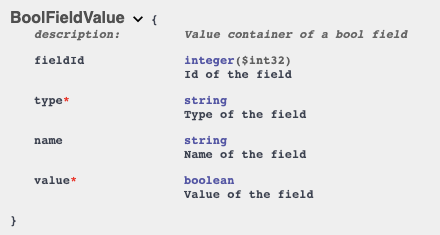
3. Based on this information you can construct the field value model as follows:
"customFields": [
  {
    "fieldId": 10003,
    "name": "Reusable",
    "value": false,
    "type": "BoolFieldValue"
  }
]
 | The type parameter describes the type of object you are sending. |
In this case, a BoolFieldValue is provided, and type.BoolFieldValue is required because of the flexibility of the tracker configuration.
Custom Choice Fields
1. The following endpoint gets the user custom choice.
URL
GET /v3/trackers/{trackerId}/fields/1001
Response Body Example
{
  "id": 1001,
  "name": "User custom choice",
  "type": "OptionChoiceField",
  "hidden": false,
  "valueModel": "ChoiceFieldValue<ChoiceOptionReference>",
  "mandatoryInStatuses": [],
  "multipleValues": false,
  "options": [
    {
      "id": 0,
      "name": "Unset",
      "type": "ChoiceOptionReference"
    },
    {
      "id": 1,
      "name": "First option",
      "type": "ChoiceOptionReference"
    },
    {
      "id": 2,
      "name": "Second option",
      "type": "ChoiceOptionReference"
    },
      "id": 3,
      "name": "Third option",
      "type": "ChoiceOptionReference"
    }
],
  "sharedFields": [],
  "legacyRestName": "userCustomChoice",
  "oslcTerm": "cb:usercustomchoice",
  "publishedOslcTerm": true,
  "referenceType": "ChoiceOptionReference"
}
2. The valueModel is a ChoiceFieldValue<ChoiceOptionReference. You need a ChoiceFieldValue which contains ChoiceOptionReference as values.
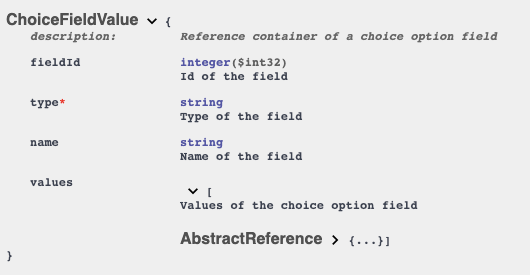
The field definition defines the available options as follows.
  "options": [
    {
      "id": 0,
      "name": "Unset",
      "type": "ChoiceOptionReference"
    },
    {
      "id": 1,
      "name": "First option",
      "type": "ChoiceOptionReference"
    },
    {
      "id": 2,
      "name": "Second option",
      "type": "ChoiceOptionReference"
    },
    {
      "id": 3,
      "name": "Third option",
      "type": "ChoiceOptionReference"
    }
  ]
3. Construct the customFields item as follows.
"customFields": [
    {
      "fieldId": 1001,
      "name": "User custom choice",
      "values": [
        {
          "id": 2,
          "name": "Second option",
          "type": "ChoiceOptionReference"
        }
      ],
      "type": "ChoiceFieldValue"
    }
]
Custom Reference Fields
1. Use the following endpoint to get the tracker item field details.
URL
GET /v3/trackers/{trackerId}/fields/1002
Request Body Example
 {
    "id": 1002,
    "name": "System",
    "description": "System which caused the Defect",
    "type": "TrackerItemChoiceField",
    "hidden": false,
    "valueModel": "ChoiceFieldValue<TrackerItemReference>",
    "mandatoryInStatuses": [],
    "multipleValues": false,
    "referenceType": "TrackerItemReference"
  },
2. This field needs a ChoiceFieldValue<TrackerItemReference> valueModel. Therefore, add a TrackerItemReference to ChoiceFieldValue as follows:
{
      "fieldId": 1002,
      "name": "System",
      "type": "ChoiceFieldValue",
      "values": [ <TrackerItemReferences> ]
    },
3. Use the following endpoint to get the available options choice fields.
URL
GET /v3/items/{itemId}/fields/{fieldId}/options
4. Use the following endpoint to get the item options.
URL
GET /v3/items/{itemId}/fields/1002/options
Response Body Example
{
  "page": 1,
  "pageSize": 25,
  "total": 2,
  "references": [
    {
      "id": 2750873,
      "name": "Rocket Science",
      "type": "TrackerItemReference"
    },
    {
      "id": 2750874,
      "name": "Warp System",
      "type": "TrackerItemReference"
    }
  ]
}
5. The following is the customFields item:
"customFields": [
    {
      "fieldId": 1002,
      "name": "System",
      "values": [
        {
          "id": 2750873,
          "name": "Rocket Science",
          "type": "TrackerItemReference"
        },
      ],
      "type": "ChoiceFieldValue"
    }
]
Custom Table Fields
1. Use the following endpoint to get the test steps.
URL
GET /v3/trackers/{trackerId}/fields/100000
Response Body Example
{
  "id": 1000000,
  "name": "Test Steps",
  "type": "TableField",
  "hidden": false,
  "valueModel": "TableFieldValue",
  "mandatoryInStatuses": [],
  "columns": [
    {
      "id": 1000001,
      "name": "Action",
      "type": "WikiTextField",
      "hidden": false,
      "valueModel": "WikiTextFieldValue",
      "mandatoryInStatuses": [
        {
          "id": 0,
          "name": "Unset",
          "type": "ChoiceOptionReference"
        },
        {
          "id": 1,
          "name": "New",
          "type": "ChoiceOptionReference"
        },
        {
          "id": 2,
          "name": "In Design",
          "type": "ChoiceOptionReference"
        },
        {
          "id": 3,
          "name": "Awaiting approval",
          "type": "ChoiceOptionReference"
        },
        {
          "id": 4,
          "name": "Accepted",
          "type": "ChoiceOptionReference"
        },
        {
          "id": 5,
          "name": "Rejected",
          "type": "ChoiceOptionReference"
        },
        {
          "id": 6,
          "name": "Outdated",
          "type": "ChoiceOptionReference"
        }
      ],
      "sharedFields": [],
      "legacyRestName": "action",
      "publishedOslcTerm": false
    },
    {
      "id": 1000002,
      "name": "Expected result",
      "type": "WikiTextField",
      "hidden": false,
      "valueModel": "WikiTextFieldValue",
      "mandatoryInStatuses": [],
      "sharedFields": [],
      "legacyRestName": "expectedResult",
      "publishedOslcTerm": false
    },
    {
      "id": 1000003,
      "name": "Critical",
      "type": "BoolField",
      "hidden": false,
      "valueModel": "BoolFieldValue",
      "mandatoryInStatuses": [],
      "sharedFields": [],
      "legacyRestName": "critical",
      "publishedOslcTerm": false
    },
    {
      "id": 1000004,
      "name": "Id",
      "type": "WikiTextField",
      "hidden": true,
      "valueModel": "WikiTextFieldValue",
      "mandatoryInStatuses": [],
      "sharedFields": [],
      "legacyRestName": "id",
      "publishedOslcTerm": false
    },
    {
      "id": 1000005,
      "name": "Test Step reuse",
      "type": "TrackerItemChoiceField",
      "hidden": true,
      "valueModel": "ChoiceFieldValue<TrackerItemReference>",
      "mandatoryInStatuses": [],
      "multipleValues": false,
      "sharedFields": [],
      "legacyRestName": "testStepReuse",
      "referenceType": "TrackerItemReference"
    }
  ],
  "sharedFields": [],
  "legacyRestName": "testSteps"
}
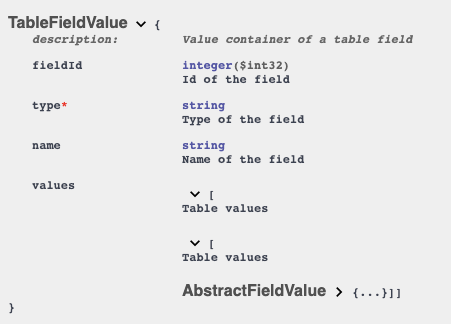
2. It needs a TableFieldValue.
The following values are a list of lists representing the rows and columns for the table field. The field definition also defines the columns.
"columns": [
  {
    "id": 1000001,
    "name": "Action",
    "type": "WikiTextField",
    "hidden": false,
    "valueModel": "WikiTextFieldValue",
    "mandatoryInStatuses": [ ... ]
  },
  {
     "id": 1000002,
    "name": "Expected result",
    "type": "WikiTextField",
    "hidden": false,
    "valueModel": "WikiTextFieldValue",
    "mandatoryInStatuses": []
  },
  {
    "id": 1000003,
    "name": "Critical",
    "type": "BoolField",
    "hidden": false,
    "valueModel": "BoolFieldValue",
    "mandatoryInStatuses": []
  },
  {
    "id": 1000004,
    "name": "Id",
    "type": "WikiTextField",
    "hidden": true,
    "valueModel": "WikiTextFieldValue",
    "mandatoryInStatuses": []
  }
]
3. The Id field is hidden, and you must construct a [WikiTextFieldValue, WikiTextFieldValue, BoolFieldValue] list for each row.
The final custom field value is as follows.
"customFields": [
    {
      "fieldId": 1000000,
      "name": "Test Steps",
      "values": [
        [
          {
            "fieldId": 1000001,
            "name": "Action",
            "value": "Action 1",
            "type": "WikiTextFieldValue"
          },
          {
            "fieldId": 1000002,
            "name": "Expected result",
            "value": "Expected result 1",
            "type": "WikiTextFieldValue"
          },
          {
            "fieldId": 1000003,
            "name": "Critical",
            "value": false,
            "type": "BoolFieldValue"
          }
        ],
        [
          {
            "fieldId": 1000001,
            "name": "Action",
            "value": "Action 2",
            "type": "WikiTextFieldValue"
          },
          {
            "fieldId": 1000002,
            "name": "Expected result",
            "value": "Expected result 2",
            "type": "WikiTextFieldValue"
          },
          {
            "fieldId": 1000003,
            "name": "Critical",
            "value": false,
            "type": "BoolFieldValue"
          }
        ]
      ],
      "type": "TableFieldValue"
    }
]
It will create the following two test steps.
