Linking Requirements with Test Cases
In document view, you can link requirements to the test cases that verify them using the Library.
After you configure the Library to show the test case tracker, the right pane shows a tree view of the test case items. To link a test case to a requirement, drag the test case from the right pane to the target requirement in the left pane. After this, the Linking Items to <item> window opens with the following options:

• Link the target Item with the original Item—This option does the following:
◦ Sets the test case as the downstream reference of the requirement.
◦ Selects the requirement as a reference in the Verifies field of that test case.
 |
The option appears only when you have edit permission for the Verifies field of the test case.
|
• Make a copy of the Items and link the target Item with the copies—This option does the following:
◦ Creates a copy of the test case.
◦ Sets the copied test case as the downstream reference of the requirement.
◦ Selects the requirement as a reference in the Verifies field of the copied test case.
• Make a copy of the Items in the target Tracker—This option creates a copy of the test case in the target tracker.
|
|
If the tracker configurations of the source and the target trackers differ, you must manually map the fields.
|
You can select a baseline during the linking process. If you select a baseline, the associations that are created between the test cases and the requirement point to the baseline version of the requirement.
Linking Requirements with Incompatible Test Cases
When a test case tracker has the Verifies field that does not reference the requirement tracker, that tracker is considered incompatible with the requirement tracker. In this scenario, the following window appears:
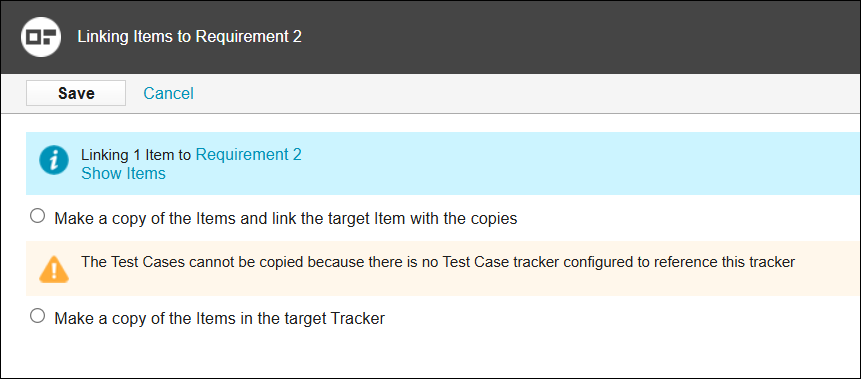
Notice the following:
• Make a copy of the Items and link the target Item with the copies—This option is not functional. The test case item cannot be copied because its test case tracker is not configured to reference the requirement tracker.
• Make a copy of the Items in the target Tracker—This option creates a copy of the test case in the requirement tracker.