Checking Codebeamer Requirement Consistency in a Simulink Model
Viewing the Newest Version of Codebeamer Requirements in Simulink Models
To view the newest version of Codebeamer requirements in Simulink models:
1. Click > > .
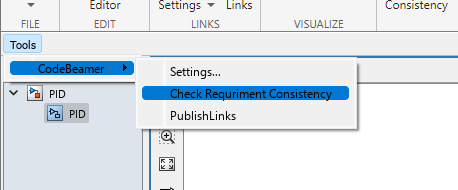
If there is a block with a requirement that was updated since the connection has been established, it is highlighted in the model.

Removing Highlighting and Warnings
To remove highlighting and warnings from Codebeamer requirements in Simulink models after checking for updates:
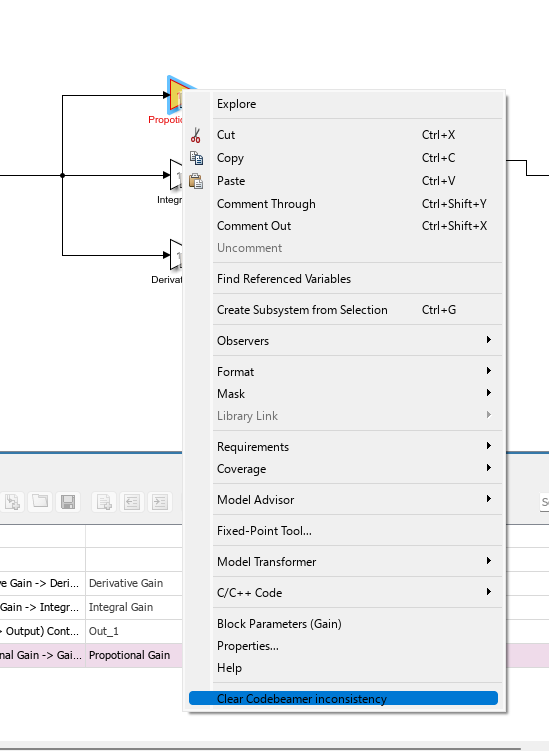
1. Right-click a highlighted block in a Simulink model and select Clear Codebeamer inconsistency.
 |
The Clear Codebeamer inconsistency command does not clear the Suspected flag in Codebeamer.
When a proxy item is backlinked from MATLAB for the first time, references are flagged as Suspected in Codebeamer. In this case, the Suspected flag can be manually cleared after backlinking.
|
For a demonstration, see the following video tutorial: Checking Codebeamer Requirement Consistency in a Simulink Model Tutorial.