脚本化工作流转变示例:如何使用自定义工作流操作将 Codebeamer 配置为同步销售线索跟踪器与其他跟踪器
需求:在工作流转变中同步各种跟踪器
销售模板项目包含以下跟踪器:
• 销售线索 - 此项代表潜在客户,是在个人或企业表明兴趣并提供其联系信息时创建的。
• 客户 - 客户以及联系人相关记录类似于地址簿。它是存储公司名称、地址、电话号码和其他重要信息的实体。
• 机会 - 机会表示向新客户或老客户进行的潜在销售。帮助我们预测未来的业务需求和销售收入。
• 联系人 - 个人的个人信息,用于联系个人探讨需求以及我们的产品。
• 活动 - 活动基本上是销售团队和其他利益相关者所执行的操作的记录。
目标是在最终确定销售线索时,即更改为 "SQL" 工作流状态,应在Accounts、Opportunities、Contants跟踪器中创建相应的项。
此图说明这些跟踪器彼此之间的关联方式。
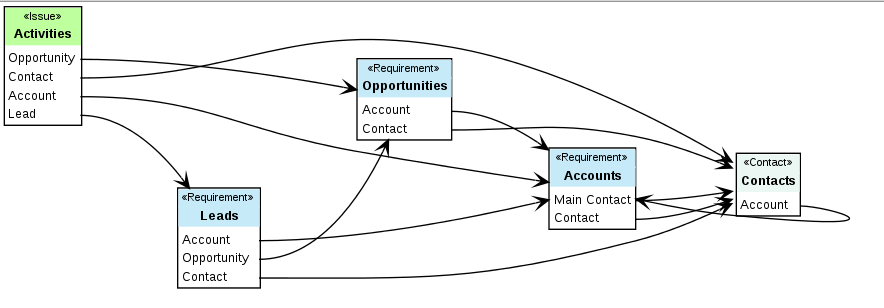
跟踪器之间的同步映射
源跟踪器字段 | 映射至... | ||
|---|---|---|---|
销售线索 | 联系人 | 客户 | 机会 |
说明 | 公司概况 | ||
名字 | 名字 | ||
姓氏 | 姓氏 | ||
职务 | 职务 | ||
部门 | 部门 | ||
公司 | 客户名称 | ||
电话 | 电话 | 电话 | |
电子邮件联系人 | 电子邮件 | ||
街道 | 街道 | 街道 | |
邮编 | 邮政编码 | 邮编 | |
城市 | 城市 | 城市 | |
国家/地区 | 国家/地区 | 国家/地区 | |
员工 | 员工 | ||
网站 | 公司网站 | ||
销售线索来源 | 销售线索来源、机会、说明 | ||
备注 | 备注 | ||
地理位置 | 地理位置 | ||
行业 | 行业 | ||
客户应指新“客户” | 客户应指新“客户” | ||
联系人应指新“联系人”。 | |||
以下是所需的字段映射。工作流应将这些字段从“销售线索”跟踪器复制到其他跟踪器的字段,如下所述。
脚本代码
下面是包含工作流操作逻辑的 Groovy 脚本。为此,需要创建新文件 $CB_HOME/CB/tomcat/webapps/cb/WEB-INF/classes/synchronizeLeads.groovy。将此 Groovy 脚本粘贴到该文件并进行保存。
// Groovy script implements a Workflow state-transition action as requested in Codebeamer SPR 326159
// registered in my-applicationContext.xml on cb.com only
import com.intland.codebeamer.persistence.dto.*;
import com.intland.codebeamer.persistence.dto.base.*;
import com.intland.codebeamer.persistence.dao.*;
import com.intland.codebeamer.manager.*;
import com.intland.codebeamer.controller.importexport.*;
import org.apache.commons.lang3.*;
if (!beforeEvent) {
return; // do NOTHING on after-event, everything is already handled in the before-event!
}
logger.info("-------------------------------------");
logger.info("Synchronizing Lead issue:" + subject);
trackerDao = applicationContext.getBean(TrackerDao.class);
trackerItemManager = applicationContext.getBean(TrackerItemManager.class);
projectId = subject.tracker.project.id
// read custom fields in "Leads" tracker
// using a helper class to access fields by name
fieldAccessor = new com.intland.codebeamer.text.excel.FieldAccessor(applicationContext);
fieldAccessor.setUser(user);
def getByLabel = { fieldName -> fieldAccessor.getByLabel(subject, fieldName) };
// set a field on contact by finding the field using its label
def setField(issue, fieldName, value) {
field = fieldAccessor.getFieldByName(issue, fieldName);
if (field != null) {
field.setValue(issue, value);
} else {
logger.warn("Can not find field <" + fieldName +"> on " + issue);
}
};
def copyField(toIssue, fieldName, toFieldName=null, defaultValue=null) {
value = fieldAccessor.getByLabel(subject, fieldName);
if (value == null && defaultValue != null) {
value = defaultValue;
}
if (toFieldName == null) {
toFieldName = fieldName;
}
setField(toIssue, toFieldName, value);
}
def updateOriginal(fieldName, value) {
setField(subject, fieldName, value);
}
def getOrCreateChoice(issue, fieldName, value) {
if (StringUtils.isBlank(value)) {
return null;
}
choicesProvider = new ChoicesProvider(applicationContext);
choiceField = choicesProvider.getFieldByName(user, issue, fieldName);
if (choiceField == null) {
return null;
}
asChoice = choicesProvider.getOrCreateChoiceByName(user, issue.tracker, choiceField, value, null);
return asChoice;
}
// first check/create account if does not exist, because this is required by contact
account = getByLabel("Account");
if (account == null) {
try {
account = new TrackerItemDto();
accounts = trackerDao.findByNameAndProjectId("Accounts", projectId);
account.tracker = accounts;
// use the trackerItemManager to copy of the source issue, because this copies comments and attachments too
request = event.getRequest();
fieldMapping = new HashMap();
Map<TrackerItemDto,TrackerItemDto> copied = trackerItemManager.copy(request, user, Collections.singletonList(subject), null, account, null, fieldMapping);
account = copied.get(subject);
logger.info("copied account's id:" + account.id);
// required fields
copyField(account, "Company", "Account Name");
copyField(account, "Description", "Company Profile"); // must fill with something, this is a required field
copyField(account, "Street");
copyField(account, "Post code");
copyField(account, "City");
copyField(account, "Country");
copyField(account, "Employees");
copyField(account, "Website", "Company website");
copyField(account, "Comment");
copyField(account, "Phone");
// industry is a choice field in the target, creating a new choice if necessary
industry = getByLabel("Industry");
logger.warn("Creating industry:" + industry)
industryAsChoice = getOrCreateChoice(account, "Industry", industry);
logger.warn("industryAsChoice:" + industryAsChoice);
if (industryAsChoice != null) {
setField(account, "Industry", Arrays.asList(industryAsChoice));
}
logger.info("Created Account:" + account);
// trackerItemManager.create(user, account, event.getData());
trackerItemManager.update(user, account, event.getData());
updateOriginal("Account", Arrays.asList(account));
} catch (Throwable th) {
logger.warn("Failed to create Account for " + subject, th);
}
}
// only create a new contact if that does not exist yet!, this also avoids infinite event loops !
contact = getByLabel("contact");
if (contact == null) {
try {
// create a new Contact
contact = new TrackerItemDto();
contacts = trackerDao.findByNameAndProjectId("Contacts", projectId);
contact.tracker = contacts;
copyField(contact, "First Name");
copyField(contact, "Last Name");
copyField(contact, "Title"); // TODO: there is NO such field here
copyField(contact, "Department"); // TODO: there is NO such field here
copyField(contact,"Phone");
copyField(contact,"E-mail", "Email");
copyField(contact,"Street");
copyField(contact,"Post code", "Zip/Postal code");
copyField(contact,"City");
copyField(contact,"Country");
copyField(contact, "Geolocation"); // TODO: no such field!
// fill the Mandatory Account field
setField(contact, "Account", Arrays.asList(account));
trackerItemManager.create(user, contact, event.getData());
logger.info("Created Contact:" + contact);
updateOriginal("Contact", Arrays.asList(contact));
} catch (Throwable th) {
logger.warn("Failed to create Contact for " + subject, th);
}
}
try {
// Account - Main Contact field should have a default value for Contact person created upon conversion
mainContact = fieldAccessor.getByLabel(account, "Main Contact");
if (mainContact == null || mainContact.isEmpty()) {
setField(account, "Main Contact", Arrays.asList(contact));
trackerItemManager.update(user, account, event.getData());
}
} catch (Throwable th) {
logger.warn("Failed to set Main Contanct field", th);
}
opportunity = getByLabel("opportunity");
if (opportunity == null) {
try {
opportunities = trackerDao.findByNameAndProjectId("Opportunities", projectId);
// create a new opportunity
opportunity = new TrackerItemDto();
opportunity.tracker = opportunities;
defaultVal = getByLabel("Account"); // use this as default value if the "opportunity" field would be empty, because this is a required field
opportunity.name = account.name; // REQUIRED field
opportunity.description = "--"; // REQUIRED field
// copyField(opportunity, "Lead Source", "Opportunity", defaultVal); // REQUIRED field
// copyField(opportunity, "Lead Source", "Description", defaultVal); // REQUIRED field
copyField(opportunity, "Lead Source");
setField(opportunity, "Account", Arrays.asList(account));
// store the "Account" to the "Contacts" table
opportunityTables = new com.intland.codebeamer.manager.trackeritems.TableFields(user, opportunity, applicationContext);
contactsTable = opportunityTables.getTableByName("Contacts");
contactColumn = contactsTable.getTableColumnByName("Contact");
contactColumn.setReferenceValues(0, Arrays.asList(contact));
trackerItemManager.create(user, opportunity, event.getData());
logger.info("Created Opportunity:" + opportunity);
updateOriginal("opportunity", Arrays.asList(opportunity));
} catch (Throwable th) {
logger.warn("Failed to create Opportunity for " + subject, th);
}
}
logger.info("-------------------------------------");
// registered in my-applicationContext.xml on cb.com only
import com.intland.codebeamer.persistence.dto.*;
import com.intland.codebeamer.persistence.dto.base.*;
import com.intland.codebeamer.persistence.dao.*;
import com.intland.codebeamer.manager.*;
import com.intland.codebeamer.controller.importexport.*;
import org.apache.commons.lang3.*;
if (!beforeEvent) {
return; // do NOTHING on after-event, everything is already handled in the before-event!
}
logger.info("-------------------------------------");
logger.info("Synchronizing Lead issue:" + subject);
trackerDao = applicationContext.getBean(TrackerDao.class);
trackerItemManager = applicationContext.getBean(TrackerItemManager.class);
projectId = subject.tracker.project.id
// read custom fields in "Leads" tracker
// using a helper class to access fields by name
fieldAccessor = new com.intland.codebeamer.text.excel.FieldAccessor(applicationContext);
fieldAccessor.setUser(user);
def getByLabel = { fieldName -> fieldAccessor.getByLabel(subject, fieldName) };
// set a field on contact by finding the field using its label
def setField(issue, fieldName, value) {
field = fieldAccessor.getFieldByName(issue, fieldName);
if (field != null) {
field.setValue(issue, value);
} else {
logger.warn("Can not find field <" + fieldName +"> on " + issue);
}
};
def copyField(toIssue, fieldName, toFieldName=null, defaultValue=null) {
value = fieldAccessor.getByLabel(subject, fieldName);
if (value == null && defaultValue != null) {
value = defaultValue;
}
if (toFieldName == null) {
toFieldName = fieldName;
}
setField(toIssue, toFieldName, value);
}
def updateOriginal(fieldName, value) {
setField(subject, fieldName, value);
}
def getOrCreateChoice(issue, fieldName, value) {
if (StringUtils.isBlank(value)) {
return null;
}
choicesProvider = new ChoicesProvider(applicationContext);
choiceField = choicesProvider.getFieldByName(user, issue, fieldName);
if (choiceField == null) {
return null;
}
asChoice = choicesProvider.getOrCreateChoiceByName(user, issue.tracker, choiceField, value, null);
return asChoice;
}
// first check/create account if does not exist, because this is required by contact
account = getByLabel("Account");
if (account == null) {
try {
account = new TrackerItemDto();
accounts = trackerDao.findByNameAndProjectId("Accounts", projectId);
account.tracker = accounts;
// use the trackerItemManager to copy of the source issue, because this copies comments and attachments too
request = event.getRequest();
fieldMapping = new HashMap();
Map<TrackerItemDto,TrackerItemDto> copied = trackerItemManager.copy(request, user, Collections.singletonList(subject), null, account, null, fieldMapping);
account = copied.get(subject);
logger.info("copied account's id:" + account.id);
// required fields
copyField(account, "Company", "Account Name");
copyField(account, "Description", "Company Profile"); // must fill with something, this is a required field
copyField(account, "Street");
copyField(account, "Post code");
copyField(account, "City");
copyField(account, "Country");
copyField(account, "Employees");
copyField(account, "Website", "Company website");
copyField(account, "Comment");
copyField(account, "Phone");
// industry is a choice field in the target, creating a new choice if necessary
industry = getByLabel("Industry");
logger.warn("Creating industry:" + industry)
industryAsChoice = getOrCreateChoice(account, "Industry", industry);
logger.warn("industryAsChoice:" + industryAsChoice);
if (industryAsChoice != null) {
setField(account, "Industry", Arrays.asList(industryAsChoice));
}
logger.info("Created Account:" + account);
// trackerItemManager.create(user, account, event.getData());
trackerItemManager.update(user, account, event.getData());
updateOriginal("Account", Arrays.asList(account));
} catch (Throwable th) {
logger.warn("Failed to create Account for " + subject, th);
}
}
// only create a new contact if that does not exist yet!, this also avoids infinite event loops !
contact = getByLabel("contact");
if (contact == null) {
try {
// create a new Contact
contact = new TrackerItemDto();
contacts = trackerDao.findByNameAndProjectId("Contacts", projectId);
contact.tracker = contacts;
copyField(contact, "First Name");
copyField(contact, "Last Name");
copyField(contact, "Title"); // TODO: there is NO such field here
copyField(contact, "Department"); // TODO: there is NO such field here
copyField(contact,"Phone");
copyField(contact,"E-mail", "Email");
copyField(contact,"Street");
copyField(contact,"Post code", "Zip/Postal code");
copyField(contact,"City");
copyField(contact,"Country");
copyField(contact, "Geolocation"); // TODO: no such field!
// fill the Mandatory Account field
setField(contact, "Account", Arrays.asList(account));
trackerItemManager.create(user, contact, event.getData());
logger.info("Created Contact:" + contact);
updateOriginal("Contact", Arrays.asList(contact));
} catch (Throwable th) {
logger.warn("Failed to create Contact for " + subject, th);
}
}
try {
// Account - Main Contact field should have a default value for Contact person created upon conversion
mainContact = fieldAccessor.getByLabel(account, "Main Contact");
if (mainContact == null || mainContact.isEmpty()) {
setField(account, "Main Contact", Arrays.asList(contact));
trackerItemManager.update(user, account, event.getData());
}
} catch (Throwable th) {
logger.warn("Failed to set Main Contanct field", th);
}
opportunity = getByLabel("opportunity");
if (opportunity == null) {
try {
opportunities = trackerDao.findByNameAndProjectId("Opportunities", projectId);
// create a new opportunity
opportunity = new TrackerItemDto();
opportunity.tracker = opportunities;
defaultVal = getByLabel("Account"); // use this as default value if the "opportunity" field would be empty, because this is a required field
opportunity.name = account.name; // REQUIRED field
opportunity.description = "--"; // REQUIRED field
// copyField(opportunity, "Lead Source", "Opportunity", defaultVal); // REQUIRED field
// copyField(opportunity, "Lead Source", "Description", defaultVal); // REQUIRED field
copyField(opportunity, "Lead Source");
setField(opportunity, "Account", Arrays.asList(account));
// store the "Account" to the "Contacts" table
opportunityTables = new com.intland.codebeamer.manager.trackeritems.TableFields(user, opportunity, applicationContext);
contactsTable = opportunityTables.getTableByName("Contacts");
contactColumn = contactsTable.getTableColumnByName("Contact");
contactColumn.setReferenceValues(0, Arrays.asList(contact));
trackerItemManager.create(user, opportunity, event.getData());
logger.info("Created Opportunity:" + opportunity);
updateOriginal("opportunity", Arrays.asList(opportunity));
} catch (Throwable th) {
logger.warn("Failed to create Opportunity for " + subject, th);
}
}
logger.info("-------------------------------------");