Target Qualifiers
Multiple input item types can be mapped to the same Codebeamer target tracker (table). In such cases, an additional set of item qualifiers must be defined to uniquely identify each subset of items within the target tracker.
In Example 1, the input item types—Functional Requirement, Performance Requirement, Scalability Requirement, Security Requirement, Maintainability Requirement, Usability Requirement, and Legal Requirement—can all be mapped to the predefined tracker System Requirement Specifications. The field Type can be used as a unique item qualifier to distinguish between these item types.
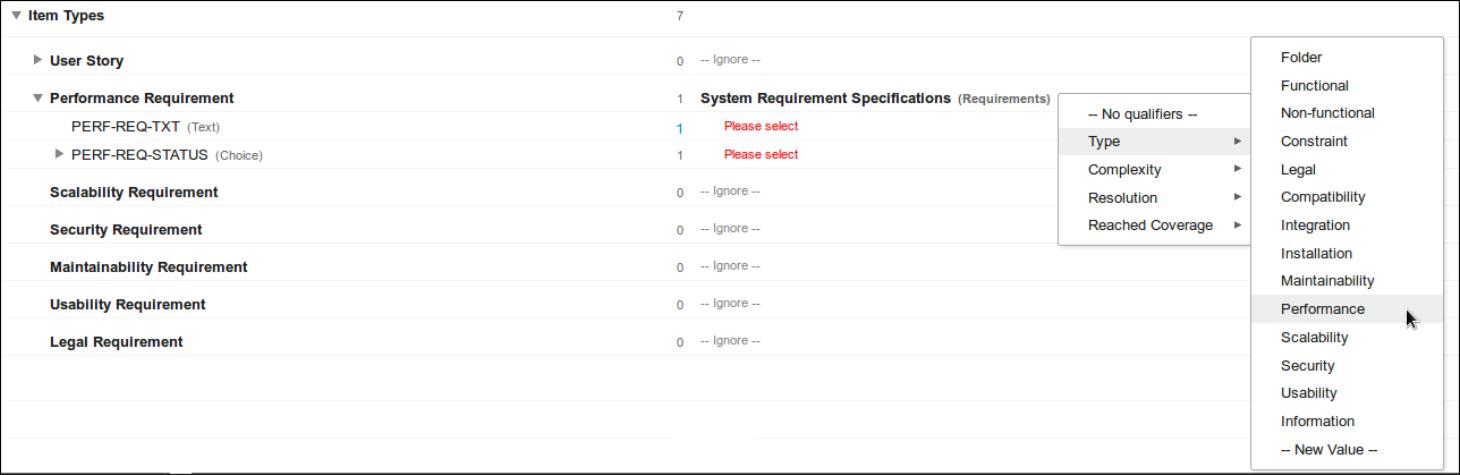
For each input item type mapped to System Requirement Specifications and using Type as item qualifier, a different type value needs to be chosen from the drop-down list.

If there is no pre-defined value matching the item type, a new value can be created via New Value... at the bottom of the drop-down list. If a single qualifier field/value pair is not sufficient, to uniquely identify item sub-sets, then add More qualifiers....
To remove chosen qualifiers, click on Remove behind the qualifier. You can re-order Multiple qualifiers by dragging them.