Escalation Management: Service Level Agreements (SLA)
This section discusses Escalation Management.
Escalation management is widely used for IT service management and is also part of the ITIL recommendations. Escalation processes ensure that unresolved problems and issues are promptly addressed. When escalation criteria such as missed deadlines are met, pre-defined actions like changing the status or a notification to a project member is triggered.Codebeamer can send notifications and take automatic action (via the Tracker workflow) whenever users (via the GUI) and clients (via the remote API) submit and modify issues, or certain events or times are reached.
With escalation, you can configure trackers to automatically flag issues that meet user defined escalation criteria, such as those needing extra attention so they become more visible in a timely manner. The escalation trigger conditions and resulting actions are both user defined.
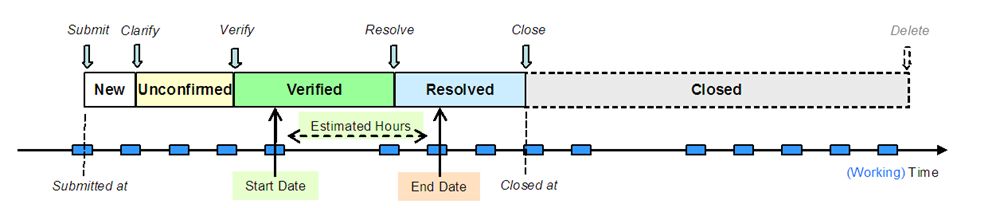
The examples in this chapter are based on the default Codebeamer roles, fields, workflow and working time, and an idealized scenario, where issues are submitted before their intended start (and end) date and the intended end date is at least the number of estimated hours (of working time) after the scheduled start date, but you can also use custom roles, fields, workflow and working time with the Escalation Management.
 |
• The Escalation Management functionality is only available within the ALM-Edition, and consulting services is mandatory to use this feature.
• Please note that the escalation rules are checked periodically in 5–minute intervals. As a result, the actual triggering time of rules can vary up to 5 minutes delay from its configured offset.
|
For more information, see:
• Trackers
|
|
Escalation can easily generate an overwhelming number of emails (notifications). Please contact PTC Technical Support for help with setting up Escalation. The following examples are for information purposes only. Care should be taken in estimating the effect of escalation rules.
|
Figure: Escalation Schematic Overview Diagram