Cluster Architecture
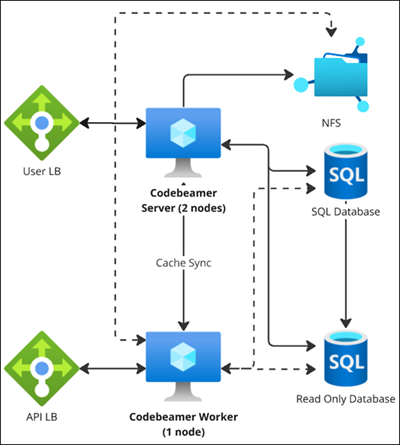
The cluster architecture for PTC Codebeamer is designed to provide high availability, scalability, and fault tolerance for the application. This architecture ensures that Codebeamer can handle large-scale deployments and maintain optimal performance under heavy loads. The key components of the cluster architecture are Load Balancers, Servers, Databases, Network File System (NFS) Worker Nodes, and Docker-based clusters.
The following diagram gives a overview of the cluster architecture highlighting their roles and interactions within a clustered environment:

Cluster Components
Load Balancer
A load balancer is a device or application that acts as a reverse proxy, distributing network or application traffic across multiple servers. PTC recommends configuring a non-sticky session to distribute the load evenly among servers.
Using a load balancer enhances performance, scalability, and security by distributing incoming traffic across nodes, preventing any single node from being overwhelmed. This improves response times and system reliability. It also supports fault tolerance by redirecting traffic to healthy nodes in case of failures, ensuring uninterrupted service for users. By terminating TLS (Transport Layer Security) connections, the load balancer off-loads the overhead of encryption and decryption from individual nodes, improving their performance and centralizing certificate management for easier updates and consistent security configurations.
Additionally, non-sticky sessions allow any request to be routed to any node without relying on session affinity, ensuring better load distribution, improved fault tolerance, and the ability to add or remove nodes dynamically without disrupting user sessions. With the load balancer handling traffic distribution, TLS termination, WebSocket support, and non-sticky sessions, the system achieves optimal performance, scalability, and a seamless user experience.
Network File System
NFS (Network File System) offers a centralized and reliable solution for managing file storage in a distributed system. It ensures that all nodes in the cluster have seamless access to the same set of uploaded files, promoting consistent behavior and preventing data duplication. By maintaining a single storage location, NFS simplifies file management and reduces the complexity of synchronizing files across nodes.
Additionally, NFS supports scalability by allowing storage capacity to grow independently of the application, accommodating increasing volumes of attachments as the system scales. It also enhances fault tolerance and availability, as shared files remain accessible to other nodes even if one node fails. With NFS, the system achieves efficient file sharing, providing a consistent and reliable experience for users who upload and access attachments
Servers
The types of Servers in a Cluster Architecture are as follows:
• Application Server: These are physical or virtual machines dedicated to running the Codebeamer application. They handle the core functionalities and business logic of Codebeamer, processing user requests and managing interactions with other servers.
• Email Server: An email server is responsible for sending and receiving emails. It uses an email application to manage email communications, ensuring that notifications, alerts, and other email-based interactions are handled efficiently.
• Database Server: A database server hosts a database application that provides database services to Codebeamer servers. For a list of supported databases, refer to the System Requirements and Platform Updates documentation.
Cluster File Systems
A cluster file system is designed to manage and provide access to files across multiple servers (nodes) in a cluster. It allows multiple nodes to read and write to the same file system simultaneously, ensuring data consistency and high availability. The following are types of file systems used in the cluster:
• Local File System: A local file system is a file system that is stored on a single physical or virtual disk attached to a single server. It is used to manage files and directories on that specific server. Codebeamer only stores static data, such as compiled Java files, on a local file system.
• Shared File System: In a cluster setup, certain folders like the repositories, need to be shared across all nodes via OS mount points. These mountpoints practically can be configured as NFS or other type of shared volumes with high performance. Shared file system allows multiple servers or clients to access the same file system over a network. This setup is commonly used in environments where data needs to be shared and accessed by multiple users or applications. Codebeamer stores all non-static data on a shared file system.
Read-only Replica Database
Using a read-only replica database decreases the load on the primary database by off-loading read-intensive queries, ensuring that write operations and critical transactions on the primary database remain unaffected. This configuration enhances performance and scalability, as the system can manage a higher volume of read queries without causing bottlenecks. Additionally, it improves reliability, allowing read operations to continue even if the primary database encounters high traffic or temporary disruptions. By isolating read operations from the main database, this architecture ensures better overall system stability and responsiveness. For more information see, About the Read-only Replica Database.
Worker Node
To optimize your setup for handling heavy jobs on large datasets and a substantial user base, you can designate a cluster node as a dedicated worker node. When configured, some long-running jobs are executed on this server, reducing the load on the active user server. Codebeamer supports configuring multiple cluster nodes as worker nodes. The purpose of the worker nodes is to reduce the load on the active user server. However, worker nodes do not guarantee faster operations.
List of jobs executed on the worker nodes:
• Background Job Scheduler
• Background Job Remover
• Coverage Browser Excel export (Release coverage | Requirement coverage | Test coverage)
• Project Export for Deployment
• Project Import for Deployment
• Document Merge Word Export
• Item Word Export
• Item Word Import
• Item Excel Export
• Item Excel Import
• Mass Edit
• Mass Test Set Run Creation
• Run In Excel
• Traceability Report Export
• Full Indexer Job
• Unique Tracker View Name Job
• Tracker Item Plain Text Migration
• Tracker Item Move (Only Via API)
• Stream Config Update
• Stream Update (Only Via API)
• Workflow action Export to Word
• Baseline Creation (Project | Tracker)
• Scheduled reports
• ReqIF Export (Project level | Tracker level)
For details, see Configuring a Server as a Worker Node in a Cluster.
Worker Node for API Requests
A dedicated node for serving API requests in a cluster offers significant advantages. This setup ensures improved performance by isolating API traffic from other tasks, allowing for faster and more efficient processing of API calls. Scalability is enhanced, as the Worker Node can be independently scaled to handle high traffic without affecting other cluster operations.
The API Server has been renamed to Worker Node.
It can execute long-running background operations. Offloading these operations to a dedicated node prevents resource contention, ensuring that other nodes remain highly responsive for real-time tasks. Resource allocation is optimized by dedicating the node to API-specific workloads, ensuring consistent and reliable performance.
The overall system efficiency improves, as the background operations can run independently without disrupting critical user-facing services.
A key benefit is that these long-running jobs can utilize a read-only replica database, further reducing the load on the primary database. Directing read-intensive operations to the replica ensures that primary database performance remains optimal for write operations and critical transactions. This architecture enhances scalability by allowing the node to handle intensive workloads while efficiently managing database queries.
Isolating long-running tasks on a specific node improves fault tolerance, as any issues with these operations are contained, minimizing the impact on the rest of the cluster. This setup ensures high performance, reliability, and a seamless experience for end-users while effectively managing background workloads and database interactions
Cache Replication in Ehcache
Cache replication in Ehcache is essential for maintaining consistency and improving the reliability of distributed applications. It ensures that cached data is synchronized across multiple nodes, allowing all nodes to access the latest information. This is critical for applications requiring high availability, as it enables failover support—if one node goes down, others can seamlessly take over without data loss.
Cache replication also enhances performance by ensuring that frequently accessed data is readily available across nodes, reducing the need for expensive database calls.
Additionally, it supports scalability by distributing the cached data load across the cluster, optimizing resource utilization and enabling smooth handling of increased traffic.
For more information, see Cache Replication.