Test Management
Test Management is supported by REST API since CB 9.0.
Create a new TestSetRun
POST /testRun
This REST API call will create a new TestSetRun from a TestSet or a group of TestCases, and generates all TestCaseRuns for them.
The request body can be null/empty, this case the TestSetRun will be automatically created in the first TestRun tracker in the same project where the TestSet or TestCases are.
Alternatively if you want to set the fields of the new TestSetRun then you can send these properties in the request body. To do this prepare the template of the new TestSetRun using the REST API (v1) new-item REST api call, and modify them as necessary.
This REST request can also contain these parameters:
Parameter name | Value/Meaning |
|---|---|
testSetId | This should be a single integer id of the TestSet from this the TestRun is created |
testCaseIds | Multiple integer ids of the TestCases: the TestRun will run these TestCases |
runOnlyAcceptedTestCases | Boolean (true/false) if the TestSetRun will contain only the Accepted TestCases. If missing then this defaults to "false". |
 | • You must provide either {testSetId} or {testCaseIds} or otherwise the request will be rejected. • When the testStep id is not specified ( null ) then the algorithm generates the id with a hash using the other teststep values. The key concept is that the teststep id needs to be unique within a test case. Once the id is set - either by explicitely giving or generated - it will not be able to be overwritten, to preserve the integrity and provide the re-usability of teststeps. |
The response will contain the created TestSetRun's JSON representation. An example is:
{
    "uri": "/item/31686",
    "version": 1,
    "tracker": {
        "project": {
            "uri": "/project/31",
            "name": "Best Tool29555764"
        },
        "uri": "/tracker/48608",
        "name": "Test Runs1498708521949"
    },
    "name": "Quick Test Run for 5 Test Cases at Jun 29 2017",
    "submitter": {
        "uri": "/user/26",
        "name": "username_1498708520199"
    },
    "modifier": {
        "uri": "/user/26",
        "name": "username_1498708520199"
    },
    "submittedAt": "2017-06-29T05:55:48+02:00",
    "modifiedAt": "2017-06-29T05:55:48+02:00",
    "sequential": false,
    "testCases": [
        [
            [
                {
                    "uri": "/item/31681",
                    "name": "TestCase #0"
                }
            ],
            null,
            null,
            null
        ],
        [
            [
                {
                    "uri": "/item/31682",
                    "name": "TestCase #1"
                }
            ],
            null,
            null,
            null
        ],
        [
            [
                {
                    "uri": "/item/31683",
                    "name": "TestCase #2"
                }
            ],
            null,
            null,
            null
        ],
        [
            [
                {
                    "uri": "/item/31684",
                    "name": "TestCase #3"
                }
            ],
            null,
            null,
            null
        ],
        [
            [
                {
                    "uri": "/item/31685",
                    "name": "TestCase #4"
                }
            ],
            null,
            null,
            null
        ]
    ],
    "descFormat": "Plain",
    "children": [
        {
            "uri": "/item/31687",
            "name": "Run of TestCase #0"
        },
        {
            "uri": "/item/31688",
            "name": "Run of TestCase #1"
        },
        {
            "uri": "/item/31689",
            "name": "Run of TestCase #2"
        },
        {
            "uri": "/item/31690",
            "name": "Run of TestCase #3"
        },
        {
            "uri": "/item/31691",
            "name": "Run of TestCase #4"
        }
    ]
}
Find TestCases of a TestSetRun
GET /testRun/{testRunId}/testCasesOnce you have a TestSetRun created by either using REST api or inside CB then you may want to query the TestCases inside the TestRun. This REST call will return them.
An example response is:
[
    {
        "uri": "/item/31681",
        "version": 1,
        "tracker": {
            "project": {
                "uri": "/project/31",
                "name": "Best Tool29555764"
            },
            "uri": "/category/48527",
            "name": "Test Cases1498708521589"
        },
        "name": "TestCase #0",
        "status": {
            "id": 4,
            "name": "Accepted"
        },
        "submittedAt": "2017-06-29T05:55:21+02:00",
        "submitter": {
            "uri": "/user/26",
            "name": "username_1498708520199"
        },
        "modifiedAt": "2017-06-29T05:55:21+02:00",
        "modifier": {
            "uri": "/user/26",
            "name": "username_1498708520199"
        },
        "description": "A sample TestCase",
        "descFormat": "Plain"
    },
    {
        "uri": "/item/31682",
        "version": 1,
        "tracker": {
            "project": {
                "uri": "/project/31",
                "name": "Best Tool29555764"
            },
            "uri": "/category/48527",
            "name": "Test Cases1498708521589"
        },
        "name": "TestCase #1",
        "status": {
            "id": 4,
            "name": "Accepted"
        },
        "submittedAt": "2017-06-29T05:55:21+02:00",
        "submitter": {
            "uri": "/user/26",
            "name": "username_1498708520199"
        },
        "modifiedAt": "2017-06-29T05:55:21+02:00",
        "modifier": {
            "uri": "/user/26",
            "name": "username_1498708520199"
        },
        "description": "A sample TestCase",
        "descFormat": "Plain"
    },
    {
        "uri": "/item/31683",
        "version": 1,
        "tracker": {
            "project": {
                "uri": "/project/31",
                "name": "Best Tool29555764"
            },
            "uri": "/category/48527",
            "name": "Test Cases1498708521589"
        },
        "name": "TestCase #2",
        "status": {
            "id": 4,
            "name": "Accepted"
        },
        "submittedAt": "2017-06-29T05:55:21+02:00",
        "submitter": {
            "uri": "/user/26",
            "name": "username_1498708520199"
        },
        "modifiedAt": "2017-06-29T05:55:21+02:00",
        "modifier": {
            "uri": "/user/26",
            "name": "username_1498708520199"
        },
        "description": "A sample TestCase",
        "descFormat": "Plain"
    },
    {
        "uri": "/item/31684",
        "version": 1,
        "tracker": {
            "project": {
                "uri": "/project/31",
                "name": "Best Tool29555764"
            },
            "uri": "/category/48527",
            "name": "Test Cases1498708521589"
        },
        "name": "TestCase #3",
        "status": {
            "id": 4,
            "name": "Accepted"
        },
        "submittedAt": "2017-06-29T05:55:21+02:00",
        "submitter": {
            "uri": "/user/26",
            "name": "username_1498708520199"
        },
        "modifiedAt": "2017-06-29T05:55:21+02:00",
        "modifier": {
            "uri": "/user/26",
            "name": "username_1498708520199"
        },
        "description": "A sample TestCase",
        "descFormat": "Plain"
    },
    {
        "uri": "/item/31685",
        "version": 1,
        "tracker": {
            "project": {
                "uri": "/project/31",
                "name": "Best Tool29555764"
            },
            "uri": "/category/48527",
            "name": "Test Cases1498708521589"
        },
        "name": "TestCase #4",
        "status": {
            "id": 4,
            "name": "Accepted"
        },
        "submittedAt": "2017-06-29T05:55:21+02:00",
        "submitter": {
            "uri": "/user/26",
            "name": "username_1498708520199"
        },
        "modifiedAt": "2017-06-29T05:55:21+02:00",
        "modifier": {
            "uri": "/user/26",
            "name": "username_1498708520199"
        },
        "description": "A sample TestCase",
        "descFormat": "Plain"
    }
]
Set the result of a TestCase
POST /testRun/{testRunId}/resultUsing this call you can set the result of a TestCase inside of a TestSetRun.
To use this:
• The {testRunId} parameter must contain the id of the TestSetRun which will contain the Test result.
• The request body can contain results of multiple TestCases in this form:
{
    "testCaseId or testCaseRunId": {
        "success": "true/PASSED or "false/FAILED" or "null/BLOCKED","conclusion": "optional conclusion text",
        "runTime": 123,
        "reportedBugIds": [
            1234,
            1235,
            1236
        ]
    },
    "testCaseId#2": {

       ...
    }
}
So the request body is a JSON object, where the:
• The key is the id number of the TestCase or the id number of the TestCaseRun.
• The value can contain the:
◦ success is a boolean. "true" means PASSED, "false" means FAILED, "null" means BLOCKED. Alternatively you can use "PASSED"/"FAILED"/"BLOCKED" strings too.
◦ conclusion is an optional string which is added to the TestRun as conclusion. This will be put to the "description" of the TestCaseRun.
◦ runTime optional run-time in seconds.
◦ reportedBugIds is an optional array of integer ids of Bugs belong to the Test-result.
As seen this request can update multiple TestCases/TestCaseRuns in one go. The request will return the updated TestCaseRun details as JSON response.
If all the TestCases in the TestSetRun has result then also the TestSetRun will become automatically Finished and its Result is automatically updated.
An example response is:
[
    {
        "uri": "/item/31687",
        "version": 2,
        "parent": {
            "uri": "/item/31686",
            "name": "Quick Test Run for 5 Test Cases at Jun 29 2017"
        },
        "tracker": {
            "project": {
                "uri": "/project/31",
                "name": "Best Tool29555764"
            },
            "uri": "/tracker/48608",
            "name": "Test Runs1498708521949"
        },
        "name": "Run of TestCase #0",
        "status": {
            "id": 4,
            "name": "Finished"
        },
        "result": {
            "id": 2,
            "name": "Failed"
        },
        "completedAt": "2017-06-29T06:01:18+02:00",
        "submitter": {
            "uri": "/user/26",
            "name": "username_1498708520199"
        },
        "modifier": {
            "uri": "/user/26",
            "name": "username_1498708520199"
        },
        "submittedAt": "2017-06-29T05:55:48+02:00",
        "modifiedAt": "2017-06-29T06:01:18+02:00",
        "sequential": false,
        "testCases": [
            [
                [
                    {
                        "uri": "/item/31681",
                        "name": "TestCase #0"
                    }
                ],
                null,
                null,
                null
            ]
        ],
        "description": "conclusion of TestCase #0\r\n//TEST_CASE_INDEX:0",
        "descFormat": "Wiki"
    }
]
Batch test result update
POST /rest/xunitresults
With this endpoint you can create and update test runs and test cases in batch mode.
It requires a form-data POST request with two parameters:
• A configuration text field where the test context can be configured.
• A file field having a zip file containing all the test results in XML files (see an example below.)
Configuration
JSON string with the following format:
{
    "testConfigurationId": "1125", // Test configuration
    "testCaseTrackerId": "2286", // The tracker id of the test cases
    "testCaseId": "", // The parent test case id
    "releaseId": "", // Release id for the tests
    "testRunTrackerId": "2290", // The tracker id where the test runs going to be populated
    "buildIdentifier": "", // Build id
    "defaultPackagePrefix": "" // Package prefix
}
A ZIP file containing one or more xml files with any name. The format of the xml files should be the following:
__<?xml version=__"1.0" __encoding=__"UTF-8"__?>__

''<!-- Generated by org.testng.reporters.JUnitReportReporter -->''

__<testsuite__ skipped__=__"0" hostname__=__"win-2012" name__=__"com.intland.codebeamer.functionaltest.test.AuthenticationTests" tests__=__"4" failures__=__"0" timestamp__=__"16 Jan 2019 23:35:21 GMT" time__=__"50.020" errors__=__"0"__>__

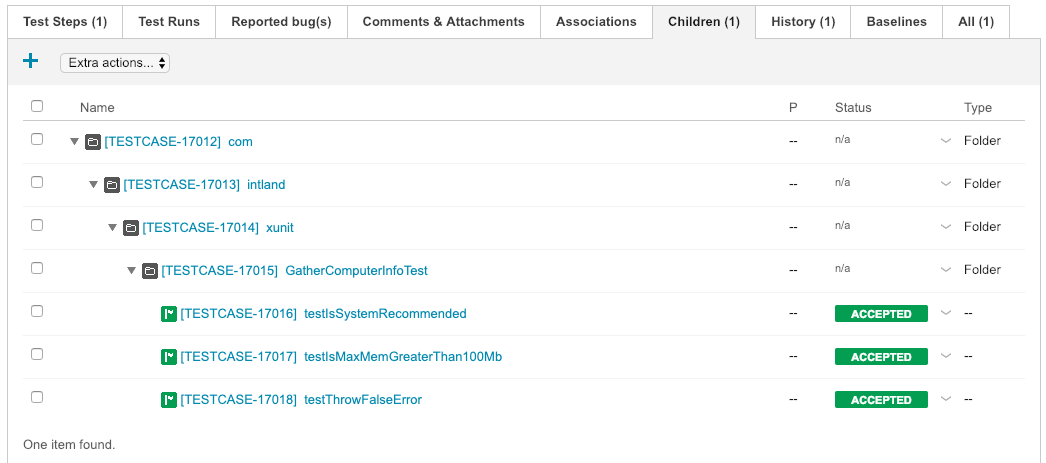
  <testcase classname="com.intland.xunit.GatherComputerInfoTest" name="testIsSystemRecommended" time="0.01">

    <failure type="junit.framework.AssertionFailedError">junit.framework.AssertionFailedError at com.intland.xunit.GatherComputerInfoTest.testIsSystemRecommended(Unknown Source)

    </failure>

</testcase>

  <testcase classname="com.intland.xunit.GatherComputerInfoTest" name="testIsMaxMemGreaterThan100Mb" time="0.001" />

  <testcase classname="com.intland.xunit.GatherComputerInfoTest" name="testThrowFalseError" time="0.001">

    <error message="ThrowFalseError" type="java.lang.Exception">java.lang.Exception: ThrowFalseError at com.intland.xunit.GatherComputerInfoTest.testThrowFalseError(Unknown Source)

    </error>

  </testcase>

__</testsuite>__ ''<!-- com.intland.codebeamer.functionaltest.test.AuthenticationTests -->''
It defines 3 testcases in a testsuite and the endpoint will generate the following test case hierarchy.
 | This endpoint requires Item - Add and Item - Edit permissions for both test case and test run trackers defined in the configuration JSON. |