Audit Trail
The Audit Trail tab of the tracker configuration displays the change history of the tracker. Tracker changes includes general tracker changes, fields related changes, state transitions related changes, and permissions related changes.
Click Export to Word to export all available audit information from the audit trail tab. Once the export is complete, the user receives an email notification along with a success message with a hyperlink to download the word document.
Below the Export to Word button, it displays the latest modified tracker configuration, along with the name of the person who modified it and the date and time of the modification.
The following audit information is available in the audit trail:
• Tracker Changes
• Field Changes
• Workflow Changes
• Transition Diagrams
• Permissions
• Permissions Changes
The Tracker Changes tab is selected by default.
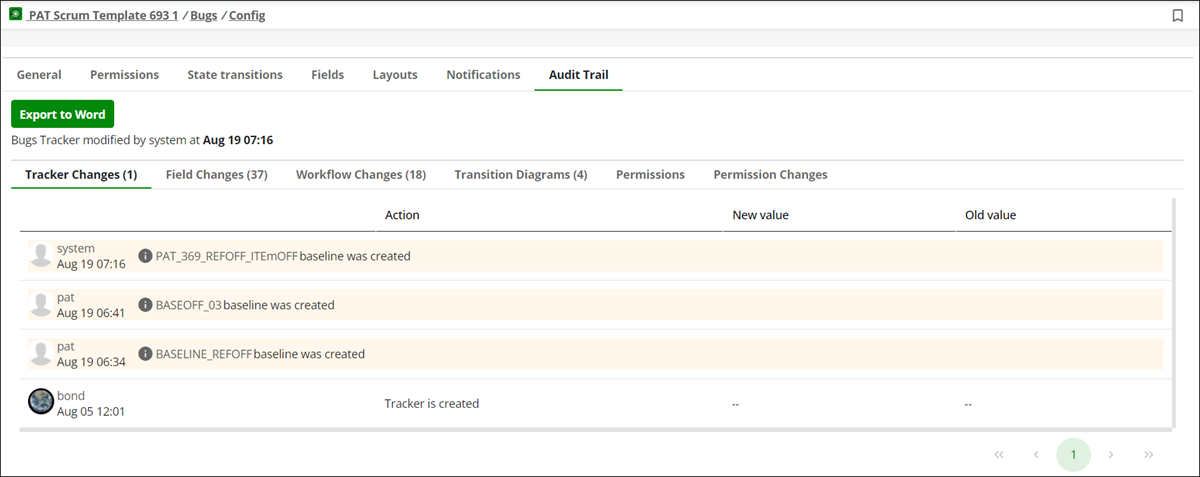
Each tab in audit trail displays the number of entries in parentheses.
Tracker Changes
It shows modifications made on the General tab. Tracker Changes tab contains following columns:
• User name who modified the configuration.
• Action: Shows the action performed by the user.
• New value: Shows the newly modified change.
• Old value: Shows the old value before the change.
Field Changes
It shows modifications made on the Fields tab. Fields Changes contains following columns:
• User name who modified the configuration.
• Field: Shows the modified field name.
• Action: Shows the action performed by the user.
• New value: Shows the newly modified change.
• Old value: Shows the old value before the change.
Workflow Changes
It shows modifications made on the State Transitions tab. Workflow Changes contains following columns:
• User name who modified the configuration.
• Name: Shows the status name which is modified.
• Action: Shows the action performed by the user.
• New value: Shows the newly modified change.
• Old value: Shows the old value before the change.
Transition Diagrams
It shows state transition diagrams for each baseline version and the head revision.
Permissions
Permissions are displayed only for head revision. It shows all permissions assigned to the various roles.
Permissions Changes
It shows the list of fields and tracker changes over the time. Permissions Changes contains following columns:
• User: Shows user name who modified the permissions.
• Artifact: Shows the modified field with the tracker Id.
• Event Type: Shows what modification is performed on the field.
• Workspace: Shows the project name associated with modification.
• Tracker: Shows the tracker type associated with field modification.
• Message: Shows the permissions changes for the modified field. To view the changes click Show changes hyperlink. A window appears with current and original changes. It displays a list of all permission with the current changes highlighted. Select Show different fields only to view only the changed permissions.
• Created at: Shows the date and time when modifications were performed.