Word에서 기록 내보내기 사용자 정의
Codebeamer 7.2.0부터 Word 내보내기를 사용하여 작업 항목 기록을 선택 적으로 내보낼 수 있습니다. 이러한 종류의 내보내기 결과는 작업 항목의 "기록" 탭에 표시되는 결과와 매우 유사하며 대부분의 경우에 적합합니다.
그러나 기록을 내보내는 방법을 사용자 정의하려고 할 수 있습니다. 이는 Word 템플릿에 사용자 정의 코드를 추가하여 달성할 수 있습니다. 예를 들어, Velocity 스크립틀릿은 기록 엔트리를 다음과 같이 한 행으로 렌더링합니다.
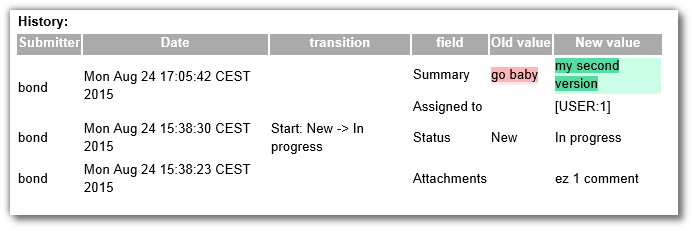
전체 예시를 보여주는 Word 문서가 여기(CB:/displayDocument/custom-history.docx?doc_id=766769)에 첨부되어 있습니다.
다음은 스크립트의 관련 부분입니다. 여기에서 어떤 작업이 수행되는지 더 잘 이해하려면 추가 설명을 참조하십시오.
## Render item/issue/requirement's history if selected on the export GUI
#if (${exportOptions.exportItemHistory})
<div class=ˮexportItemHistoryˮ><b>History:</b><br/>
#set($historyRenderer = $springDispatcherServletContext.getBean(“trackerItemHistoryTableRenderer”))
## call the original history rendering, because this will populate the model and put the data-objects to the request
#set($hist = $!{historyRenderer.renderTrackerItemHistory($request, $user, $requirement)})
## Custom history rendering goes here
## The $historyRenderer above has collected the history objects and those are in the request here:
#set($itemHistory=$request.getAttribute(“itemHistory”))
<table>
<tr><th>Submitter</th><th>Date</th><th>transition</th><th>field</th><th>Old value</th><th>New value</th></tr>
#foreach ($history in $itemHistory) ## $history now is a TrackerItemRevisionDto
#set($first = true)
#set($changes = $history.changes) ## each property change is a TrackerItemHistoryEntryDto
#set($rowspan = $changes.size())
#foreach ($change in $changes)
<tr>
#if ($first)
<td rowspan=ˮ${rowspan}ˮ>#if($first) $!{history.submitter.name} #end</td>
<td rowspan=ˮ${rowspan}ˮ>#if($first) $!{history.submittedAt} #end</td>
<td rowspan=ˮ${rowspan}ˮ>#if($first) $!{history.transition}#end </td> ## this is a WorkflowTransitionDto
#end
<td>$!{change.fieldName}</td>
<td>$!{change.oldValue}</td>
<td>$!{change.newValue}</td>
</tr>
#set($first = false)
#end
#end
</table>
</div>
#end