Reviewing and Merging Changes
You use Working-Sets to work on different versions or variants of specifications in parallel without interference. When working in parallel on the same specification in different Working-Sets, it is essential to be able to efficiently identify and merge changes implemented in the different Working-Sets.
Modifications in Working-Sets
Initially, the items in a Working-Set are the exact copies of the original items.
When you update or create an item, you see notification badges on that item in a non-Default Working-Set. A yellow badge is displayed if the item was updated or created in that Working-Set. A blue badge is displayed if the Working-Set is a child of the Working-Set where the item was updated or created.
See the following example:
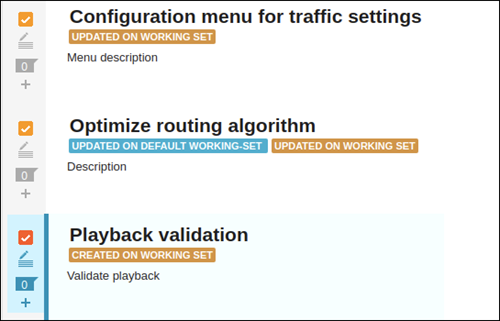
The possible badges are:
• CREATED ON WORKING SET: The item was created on this Working-Set after the last merge, but it does not exist on the parent Working-Set.
• UPDATED ON WORKING SET: The item was updated on this Working-Set after the last merge and it is different from its pair on the parent Working-Set.
• UPDATED ON DEFAULT WORKING SET: The pair of this item on the default Working-Set was updated after the last merge and is different from the Working-Set item.
Clicking the Created or Updated badge displays the differences between the items in a dialog box. You can use this dialog box to merge the item.

The badge for an item is removed after the merge operation between the Working-Set and its parent.