Navigating to Work Items
You can open the details of a work item in a tracker by clicking the link in the Summary field.
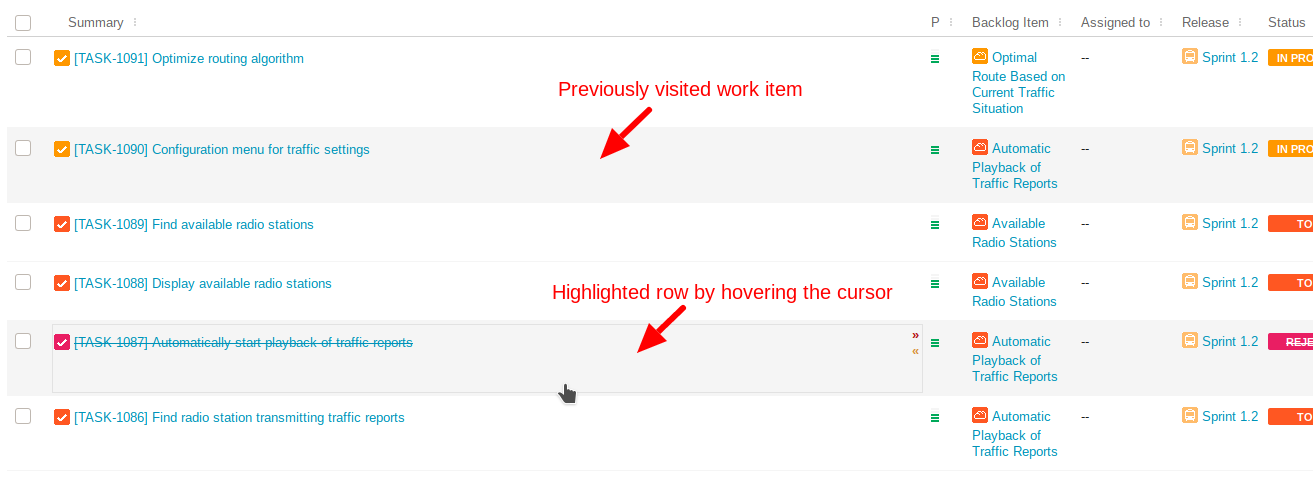
The row of the selected work item is marked by a light grey background and the browser opens the item details page. This marking is retained in the browser session to help finding the last active work item.
When you navigate back to the tracker by any of the following methods, the row selected previously remains marked.
• Click the browser's back button.
• Use the breadcrumb navigation by clicking the name of the tracker.
• Select the same tracker from the menu of the Trackers tab.
• Navigate back to the tracker anytime later until changing the filter by clicking  or changing the view by clicking
  .
.
or changing the view by clicking .• Navigate back to the page where the item was selected until you click another work item.
The marking is cleared in any of the following cases:
• User logs out.
• New view is selected on the current tracker using view manager.
view manager.• Changing the filter of the current tracker using .
.