JIRA Fields Synchronization
JIRA issue Fields need to be mapped to Codebeamer Tracker fields.
The JIRA issue
• Id
• Key
• Summary
• Description
Are always synchronized implicitly according to the synchronization Direction.
The JIRA issue Attachments are synchronized by default, but can be changed, if necessary. All other Fields must be mapped to Tracker Fields manually.
Only the fields on the Create Issue screen for the selected JIRA Project and Issue Type are available for synchronization. In case of a missing field, check the appropriate Create Issue screen configuration in JIRA.The values of the JIRA issue
• Creator
• Created
• Updated
Fields can only be imported into Codebeamer.
JIRA automatically sets these fields to the current user and current date upon issue creation or issue update and does not allow to amend these field values otherwise.
The same restrictions apply to the JIRA Change Log: Codebeamer can read/import the JIRA change log but cannot write/export its own change history to JIRA.

For each field, it can be configured whether to:
• Ignore field
• Import Values - JIRA  Codebeamer
Codebeamer• Export Values - JIRA  Codebeamer
Codebeamer• Synchronize Values - JIRA  Codebeamer (bi-directionally)
Codebeamer (bi-directionally)
 | Values of JIRA fields which are not editable/writable (by the specified user) can only be imported. |
| | Values of Codebeamer fields which are not editable (for example, fields with computed values) can only be exported. |
Mandatory fields in JIRA are marked with an asterisk.
Exporting new Codebeamer tracker items to JIRA (Create a new JIRA issue)
• without mapping the mandatory fields to Codebeamer tracker fields,
• or, without exporting/synchronizing the Codebeamer field value to JIRA,
most probably fails, unless the JIRA field has a default value.
The field value synchronization mode is not restricted by the currently selected synchronization Direction:
• The configuration of the field value synchronization can be changed to Export or Bi-directionally even if the current Direction is Import Only, or vice versa.
• This way, there is no need to adjust all field synchronization modes every time the synchronization Direction is changed.
| | Only those fields are synchronized where the field synchronization mode points into the actual synchronization direction, therefore, an Import followed by an Export. |
For JIRA picker fields, choice values also need to be mapped to Codebeamer ALM's choice options. Missing choice options can be created via New... , if necessary.
For example:
JIRA Status Codebeamer Status
Codebeamer Status
When creating New Codebeamer Status options:
• Tracker Fields can have specific Permissions and Allowed Values per Status.
◦ Such fields do not allow values and permissions for the newly added Status; therefore, these fields may not be visible/editable for imported items in this Status.
• If the Tracker Workflow is active,
◦ No State Transitions leads in or out of the newly added Status.
◦ Imported items in this Status are not able to proceed in the workflow unless the newly added Status is connected via newly defined State Transitions.
The JIRA connector does not modify the existing Codebeamer State Transitions, unless:
• The synchronization direction is Export or Synchronize, and
• The JIRA Status field is mapped to the Codebeamer Status field, and
• The Codebeamer Status (values) should be Exported or Synchronized to JIRA.
Then, the workflows are only synchronized (by replacing the Codebeamer workflow with the JIRA workflow, see below), if
• The user has JIRA System Administrator permission, or
• The user synchronizes the workflows manually.
If multiple JIRA choice options are to be mapped to new target choice options, new target options can be created for all of them by clicking on the downward arrow icon next to the JIRA choice field name:
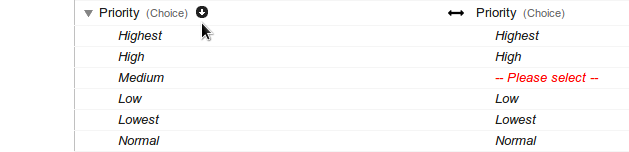
Fields to import/synchronize that do not have an appropriate counterpart in the Codebeamer Tracker can be added based on the JIRA field definition. Click on New...
Example: Create a new field for Component/s:

Adopt the name of the JIRA field for the new Codebeamer tracker field, or use a different name:

Even if the target selector does not show a field with the specified name, you can still get a name conflict because each target field selector only shows those existing tracker fields which are assignment compatible to the JIRA field, but the new field name must be unique for all tracker fields! In that case, try another name.
Depending on the nature/meaning/type of a field, the following fields cannot be mapped to new custom fields, but only to their predefined targets:
• Creator
• Created
• Updated
• Sprint
• Roles
• Attachments
• Comments
• Worklog
• Change Log.
In Codebeamer 9.2 and older, only JIRA Core Fields can be synchronized. Fields defined by JIRA plugins and extensions (for example, Epic links from JIRA Agile) are not available for synchronization.

Since Codebeamer 9.3, JIRA Agile Fields, (for example, Sprint and Epic Link) can be synchronized:

There are not any pre-defined Codebeamer Epic reference fields, therefore, a new/custom target field needs to be defined for the JIRA Epic Link field.
• If Epics linking is enabled, the target tracker field is a reference field to the imported Epic work item.
• If Epics linking is disabled, it behaves a text field which only contains the key to the JIRA Epic.
The JIRA Sprints can either be ignored or imported as Sprints.
In Codebeamer:
• Releases and Sprints are both config items of type Release in the Releases tracker, where:
◦ Releases are the top-level items, and
◦ Sprints are typically children of Releases or other Sprints.
• The Release and Sprint planning assign work items to releases and sprints only via the predefined target versions reference field (the field label can be different, for example, Release):
In JIRA:
• Versions and Sprints are different entities and are associated with issues via different reference fields:
◦ Versions via Fix Version/s
◦ Sprints via Sprint
• Sprints are not related to Versions.
Codebeamer Release and Sprint planning work with imported JIRA issues if both the JIRA Versions and JIRA Sprints
• are imported into the same Codebeamer Releases tracker;
◦ since there is no relation between Sprints and Versions in JIRA, imported Sprints are top-level items in Codebeamer.
• are associated with work items via the same (target) versions field.
◦ There are no extra Sprints field in the target Codebeamer tracker. Sprints are only an alias for all work items,
▪ that represent imported JIRA Sprints,
▪ and that are associated with the tracker item via the (target) versions field.
At the bottom of the Fields list, choose whether to
• Ignore
• Import
• Export
• Synchronize

The Roles mapping is primarily for synchronizing
• Fields of type Role(s)
• Comments visibility is based on Role(s):
◦ JIRA can restrict comment visibility to a single role or group.
◦ Codebeamer can restrict comment visibility to multiple roles and/or participants (member fields, for instance, Submitter, Assigned To, Owner).
◦ The only common restriction that can be synchronized is a single role.
| | Creating a new target role only creates an appropriate role stereotype/value, and not an actual Role in the target Codebeamer project. |
In JIRA, the size of issue attachments is limited.
When configuring to export or synchronize Attachments, the JIRA administrator needs to check or adjust, if needed the issue attachment size limit.
| | Comments, Worklog and Change Log can only be synchronized if Users are synchronized. |
The Worklog is imported as the item of the Timekeeping tracker within the Codebeamer Project, and is shown as Time Recordings for Subject under the References of the imported issue.
If the JIRA Change Log is imported as Codebeamer issue History, only mapped Fields related Change Log entries are imported.
The following entries are ignored:
• Project
• Key
• Workflow
• Labels
• etc.
There are JIRA Change Log entries related to Comments, Attachments, Issue Links and Work Log that have no equivalent in Codebeamer (Work Log) or are handled, stored differently.
Codebeamer can only read/import the JIRA Change Log. Writing/exporting its own change history to JIRA is not possible.
This also affects the export of issues, issue changes, attachments, comments and worklog entries from Codebeamer to JIRA:
• The export is executed as specified by the JIRA user in the JIRA Synchronization Settings.
• All (exported) issues, issue changes, attachments, comments and worklog entries are associated with this user in JIRA, and
• not with the user that originally created the issue (change), comment or worklog entry in Codebeamer.