Reviewing the Information on the Pending Data Tab
For each Creo Elements/Direct Modeling application, you can open the Pending Data tab to view the product and system information that was collected by the Diagnostic Tools. Click Pending Data to review this information.
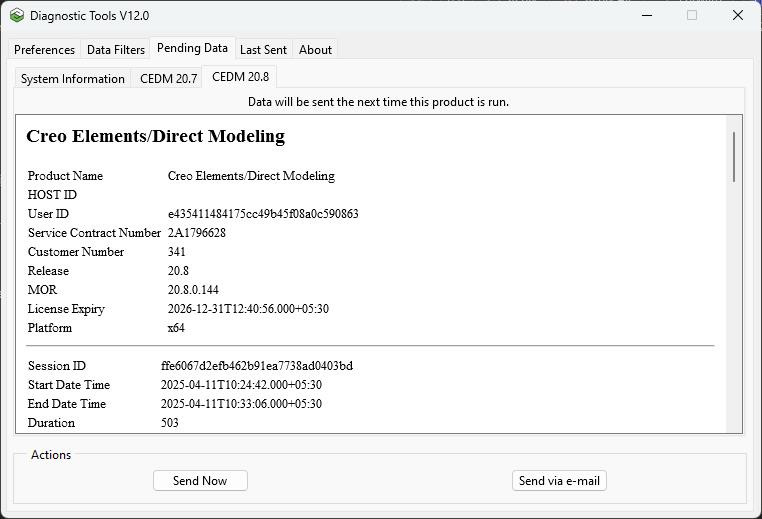
Each tab within Pending Data contains detailed information collected on the system and Creo Elements/Direct Modeling products. On the tab for the application that is active, you can perform the following actions:
• Click Send Now to send the product and system information to the database via secure https communication protocol. For example, if the CEDM 20.8 tab is active, the product and system information for Creo Elements/Direct Modeling is sent to the database.
• Click Send via e-mail to send a report as an attachment to an email message to a specific PTC Technical Support Engineer or administrator. For example, if the Creo Elements/Direct Modeling tab is active, you can send a report for Creo Elements/Direct Modeling to a PTC Technical Support Engineer.
 | The CEDM 20.8 tab contains details about the modules as shown in the following figure: 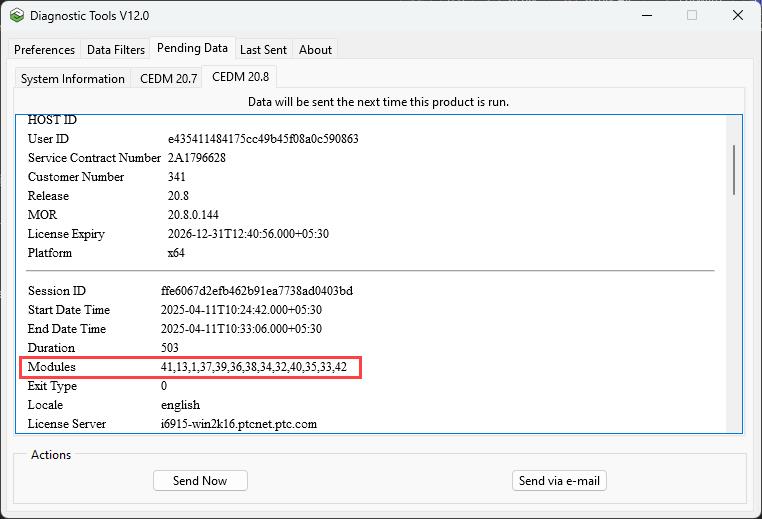 The mapping of the module numbers to the module names is available in the ModuleNumberNameMapping.txt file, located in <Creo Elements/Direct Modeling installation directory>\personality\. |