Setup Tab
The Setup tab provides some basic information about the setup of Arbortext Publishing Engine.
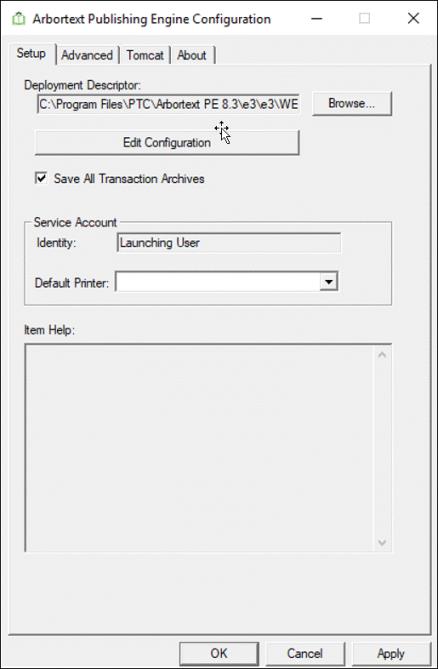
• The location of the Arbortext Publishing Engine web.xml is displayed in the Deployment Descriptor field.
• Edit Configuration launches Arbortext Publishing Engine Interactive and automatically opens the e3config.xml file containing the Arbortext Publishing Engine configuration settings.
• Service Account displays the Identity of the Arbortext Publishing Engine. If the value in this field is Launching User, then the Arbortext PE 子进程 run under the servlet container account. Most servlet containers run as a Windows service under the Windows SYSTEM account. For more information about setting up the Arbortext Publishing Engine as a specific user account, refer to Installation Guide for Arbortext Publishing Engine.
• Service Account group displays a Default Printer for the Arbortext Publishing Engine user account. If you use Arbortext Publishing Engine to produce PostScript output, you need to choose a PostScript printer from the list. You don’t need to choose a PostScript printer for producing PDF.
If the Arbortext Publishing Engine is running as a specified user, you need to choose the default printer for the Arbortext Publishing Engine user account in the Windows Printers window.
 | If a print request from Arbortext Editor uses APP, a PDF will be returned to the user for printing. |
To set the default printer for a specified Arbortext Publishing Engine user account, you must login under this account and set the default printer as you would for any Windows account. However, the Arbortext Publishing Engine 配置 doesn't display the default printer even after you have manually set it. The (must set manually) message persists in the Default Printer field. You can try a test using PostScript output to confirm the printer is recognized by the Arbortext Publishing Engine.
• Save All Transaction Archives checkbox allows you to enable or disable saving all publishing transaction archives. You can use the saved publishing transactions for troubleshooting or performance analysis. After selecting the Save All Transaction Archives checkbox, click Apply. This updates the e3config.xml file automatically by setting the com.arbortext.e3.transactionArchive.selector parameter to all and com.arbortext.e3.transactionArchive.clearOnStart parameter to false. If you manually set the com.arbortext.e3.transactionArchive.clearOnStart parameter to true in the e3config.xml file located at PE_HOME\e3\e3\WEB-INF\e3config.xml, and then enable the Save All Transaction Archives checkbox, the system resets the com.arbortext.e3.transactionArchive.clearOnStart parameter to its default value false.
After applying the change, you must restart Apache Tomcat or Arbortext Publishing Engine. This setting remains active across sessions until it is manually updated. Clearing this checkbox reverts the setting to default. It sets the value of com.arbortext.e3.transactionArchive.selector parameter to log and saves error entries, as well as requests with log entries or intermediate files. After applying the change, restart Apache Tomcat or Arbortext Publishing Engine.
Parent topic