DITA Map Reviewer
DITA Map Reviewer Overview
The DITA Map Reviewer provides a tree view of the loaded DITA map in a dedicated panel on the left side of the Arbortext Editor window. The panel enables you to navigate the map hierarchy, including submaps, and open topics in the editing pane on the right. This view helps you review topic content in the context of the overall map.
Enabling DITA Map Reviewer
Enable or disable the DITA Map Reviewer panel using View > DITA Map Reviewer or by clicking the DITA Map Reviewer icon  on the toolbar. The menu item and the toolbar icon toggle the panel on and off.
on the toolbar. The menu item and the toolbar icon toggle the panel on and off.When the DITA Map Reviewer panel is displayed, it appears on the left side of the Arbortext Editor window. The Resource Manager, when present, appears to the right of the DITA Map Reviewer.
The DITA Map Reviewer stores its current state in the arbortext.wcf preferences file so that the state can be restored in future sessions.
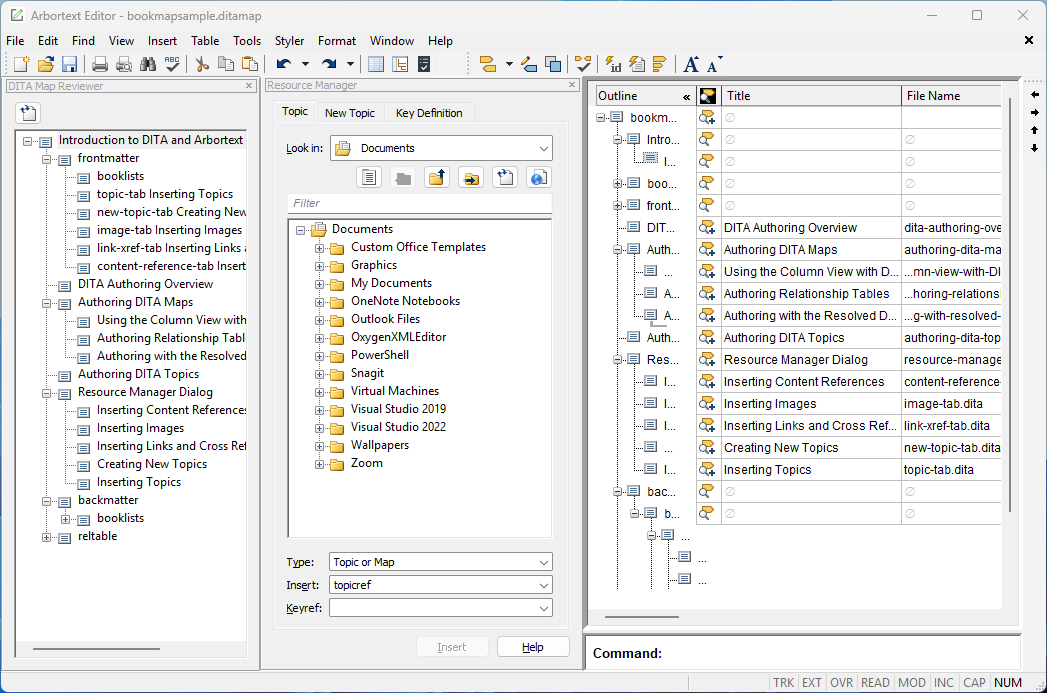
The DITA Map Reviewer displays the DITA map as a tree in a dedicated panel on the left side of the Arbortext Editor window. Submaps appear as child nodes and can be expanded to view their contents. Selecting a topic in the tree opens that topic in the editing pane on the right, allowing you to review the topic content in the context of the map. When you edit a topic title, click Refresh icon  to reload the DITA Map Reviewer panel and for the updates to take effect.
to reload the DITA Map Reviewer panel and for the updates to take effect.