创建 Glossary
按照以下步骤创建 Glossary 主题:
1. 选取 > 。
新建文档对话框将打开。
2. 在类别列表中选择 DITA Technical Content 的相应版本,以及在类型列表中选择 DITA Glossary,然后单击确定。
DITA Glossary 模板载入到 Arbortext Editor 窗口中:

3. 在 glossterm 标记中输入以下文本:
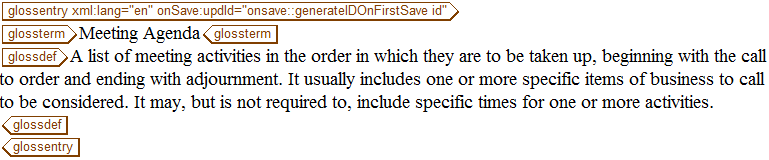
Meeting Agenda
4. 在 glossdef 标记中输入以下文本:
A list of meeting activities in the order in which they are to be taken up, beginning with the call to order and ending with adjournment.It usually includes one or more specific items of business to be considered.It may, but is not required to, include specific times for one or more activities.
5. 以名称 meetingAgenda.dita 保存 Glossary。
完成的 Glossary 应当如下所示: