Nesting Profiles
Profile classes can contain folders containing more folders and profiles. Using such a structure provides a categorization of related profiles. In this example, several Windows platforms are categorized in a parent Windows folder.
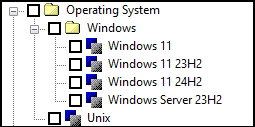
Example of nested profiles in the Apply Profiles dialog box.
This profiling configuration is created with the following markup:
<Profile attribute="os" alias="Operating System">
<ProfileFolder name="Windows">
<Allowed value="Windows 11"/>
<Allowed value="Windows 10"/>
<Allowed value="Windows Server 23H2"/>
</ProfileFolder>
<Allowed value="Unix"/>
</Profile>
<ProfileFolder name="Windows">
<Allowed value="Windows 11"/>
<Allowed value="Windows 10"/>
<Allowed value="Windows Server 23H2"/>
</ProfileFolder>
<Allowed value="Unix"/>
</Profile>
Parent topic