용어집 만들기
다음 단계에 따라 Glossary 항목을 만듭니다.
1. > 를 선택합니다.
새 문서 대화 상자가 열립니다.
2. 카테고리 목록에서 적절한 DITA Technical Content 버전을 선택하고 유형 목록에서 DITA Glossary를 선택한 다음 확인을 클릭합니다.
DITA Glossary 템플릿이 Arbortext Editor 창에 로드됩니다.

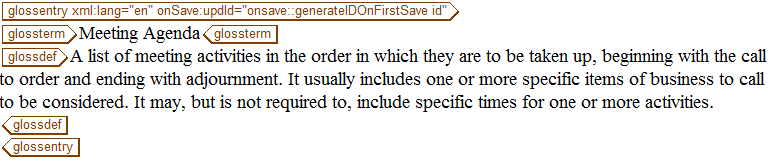
3. glossterm 태그에 다음 텍스트를 입력합니다.
Meeting Agenda
4. glossdef 태그에 다음 텍스트를 입력합니다.
A list of meeting activities in the order in which they are to be taken up, beginning with the call to order and ending with adjournment. It usually includes one or more specific items of business to be considered. It may, but is not required to, include specific times for one or more activities.
5. meetingAgenda.dita라는 이름으로 Glossary를 저장합니다.
완료된 Glossary는 다음과 같은 형식이어야 합니다.