Glossary の作成
以下の手順に従って、Glossary トピックを作成します。
1. > を選択します。
「新規文書」ダイアログボックスが開きます。
2. 「カテゴリ」リストから適切なバージョンの「DITA Technical Content」を選択し、「タイプ」リストから「DITA Glossary」を選択して、「OK」をクリックします。
DITA Glossary テンプレートが Arbortext Editor ウィンドウに読み込まれます。

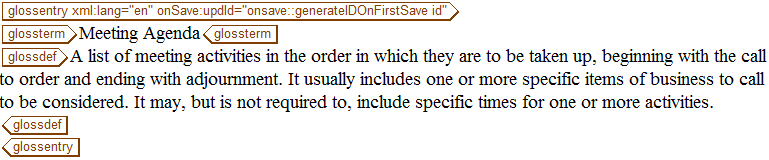
3. glossterm タグに次のテキストを入力します。
Meeting Agenda
4. glossdef タグに次のテキストを入力します。
A list of meeting activities in the order in which they are to be taken up, beginning with the call to order and ending with adjournment.It usually includes one or more specific items of business to be considered.It may, but is not required to, include specific times for one or more activities.
5. Glossary を meetingAgenda.dita という名前で保存します。
完成した Glossary はこのようになります。