Help
>
Authoring
>
Equations
>
Inserting Math Elements in an Equation
>
Adding Matrices
> Deleting a Column from a Matrix
Deleting a Column from a Matrix
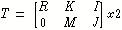
To delete the middle column from the following example matrix
1.
In the
Equation Editor
window, click on “
M
” to place marker. (Putting the marker around “
K
” would also work.)
2.
Choose
Constructs
>
Matrices
>
Operations
>
Delete Column
.
Was this helpful?
This site works best with JavaScript enabled