Complex Profiling
Profiles are inherited by the children of a profiled element. For example, if you apply profiles to an entire chapter, all elements within that chapter inherit the same profile values. You can apply more restrictive profiling to individual child elements.
 |
Select a specific element and its contents when you want to apply profiling. If you select a region of content within an element, the profiling is applied to the parent element containing the content region. Selecting a content region to apply profiling removes any other profiling that had been applied to elements within the parent element.
|
For this example, the profile classes Operating System and Security have the following profiling values:
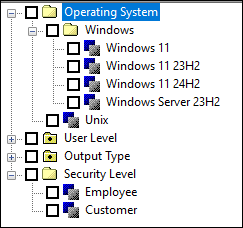
Assume that your document includes two chapters, each containing two parallel sections that are profiled as follows:
Chapter | Section | Content | Applied Profiles |
|---|---|---|---|
1 | n/a | Information applicable to Windows 10 and Windows 11 users. | Windows 10, Windows 11 |
1.1 | Information applicable to Windows 10 and Windows 11 users. | None | |
1.2 | Information applicable to Windows 10 users only. | Windows 10 | |
2 | n/a | Information applicable to all UNIX users. | UNIX |
2.1 | Information applicable to all Customers using UNIX. | Customer | |
2.2 | Information applicable to all Employees using UNIX. | Employee |
Be aware of the following aspects of the applied profiles in the table:
• Section 1.1 is not profiled because it matches the profile for the entire chapter.
• Some elements may apply to more than one profile within a given profile class. In this example, chapter 1 applies to both the Windows 10 and Windows 11 profiles within the Operating System profile class. Be sure to include all profiles that apply.
• Selecting multiple profiles within a profile class means either value is valid. Depending on the settings for other profile classes, chapter 1 displays if the publish profile includes either the Windows 10or the Windows 11 profile (or both).
• Section 1.2 is exclusive to Windows 2000, so only the Windows 10 profile is applied. Applying the UNIX profile is impossible because the parent element (that is, chapter 1) does not include the UNIX profile.
• Even though sections 2.1 and 2.2 do not further restrict the profiling within the Operating System profile class, sections 2.1 and 2.2 have applied profiles for another profile class. This is perfectly legal.