创建 Reference
按照以下步骤创建 Reference 主题:
1. 选取 > 。
新建文档对话框将打开。
2. 在类别列表中选择 DITA Technical Content 的相应版本,以及在类型列表中选择 DITA Reference,然后单击确定。
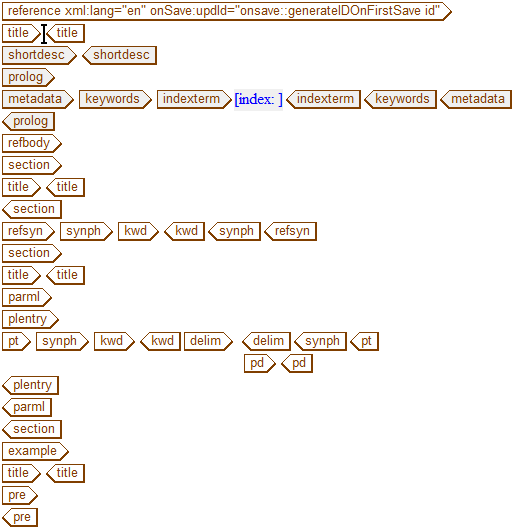
DITA Reference 模板载入到 Arbortext Editor 窗口中:
3. 在 title 标记中输入以下文本:
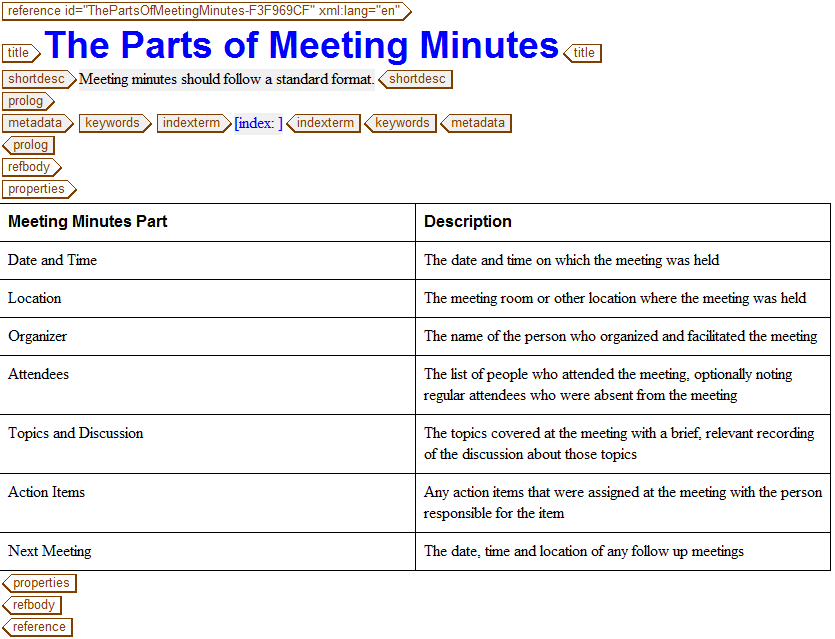
The Parts of Meeting Minutes
4. 在 shortdesc 标记中输入以下文本:
Meeting minutes should follow a standard format.
5. 选择并删除 refbody 标记内部的所有标记。
可通过以下方式选择标记中的所有内容:将光标置于起始 refbody 标记的右侧并按 CTRL+E。
6. 使用“快速标记”或 > 在 refbody 内部插入 properties 标记。
properties 标记在“编辑”视图中显示为表格:
7. 选择值列并选择 > > 。
该列将从表格中删除。
8. 在标题行的第一个单元格中选择文本 类型,并用以下文本将其替换:
Meeting Minutes Part
9. 按 TAB 两次并在下一行的第一个单元格中输入以下文本:
Date and Time
10. 按 TAB 并在该行的第二个单元格中输入以下文本:
The date and time on which the meeting was held
11. 使用 > > 、
在下方插入行
工具栏按钮或 TAB 键按需插入附加行,以将下列附加属性和说明添加到属性表中:
Location | The meeting room or other location where the meeting was held |
Organizer | The name of the person who organized and facilitated the meeting |
Attendees | The list of people who attended the meeting, optionally noting regular attendees who were absent from the meeting |
Topics and Discussion | The topics covered at the meeting with a brief, relevant recording of the discussion about those topics |
Action Items | Any action items that were assigned at the meeting with the person responsible for the item |
Next Meeting | The date, time and location of any follow up meetings |
12. 以名称 meetingMinutes.dita 保存 Reference。
完成的 Reference 应当如下所示: