Part Relationships
Parts in Arbortext Content Delivery can have the following types of relationships:
• Supersession
• Cross References
• Alternates
Supersession
A superseded part is a part that has been replaced by another part or parts. Depending on the part’s history, there can be a series of parts that have been superseded since that part was released. The sequence of superseded parts is called a supersession chain.
If a part has been superseded, the Supersession link appears in the part list for the part. Clicking that link opens the Supersession tab on the part information page. You can view the supersession chain as either a tree or a flat list. Following is an example of the tree view:

By default, supersession is shown as a forward chain. In this case, the part or parts that have superseded a part are shown in a forward direction. A forward chain can have the following types of supersession relationships:
• One-to one relationship
In this case, a part has been superseded by a single part:

• One-to-N relationship (AND)
In this case, a part has been superseded by a group of parts:

• One-to-N relationship (OR)
In this case, a part has been superseded by more than one part, any of which can be used as the replacement part:

You can also view supersession as a backward chain. In this case, the part or parts that have superseded a part are shown in a backwards direction. To see the backwards supersession chain for a part, click Show Part History on the supersession tab. Following is a backwards chain displayed as a flat list:

If your administrator has enabled the Calculate and display a “Preferred chain” for a part preference, the supersession list displays the preferred chain for a part as the backwards supersession chain in a flat list. The part that it is suggested you order is indicated as Preferred with a star:

Group Supersession
This functionality is introduced to show a part superseded by a group. A new property ‘com.ptc.sc.cart.excludeGroupPartFromCart’ is introduced in wt.properties directory located at InS_SW/SW/Applications/Windchill.ear/codebase.war
By default, the property value is true. In accordance with this change, there are some changes in the behavior and notification messages for Add All To Cart scenarios for the partsLists having group supersession.
When com.ptc.sc.cart.excludeGroupPartFromCart property is true
If Calculate and display a Preferred chain for a part preference is True, the system ensures only relevant parts are added, while skipping parts having group supersession.
If Calculate and display a Preferred chain for a part preference is False, the behavior depends on user preference:
• Skip — Parts having supersession are entirely skipped.
• Requested — Adds all requested parts, while skipping parts having Group Supersession.
• Preferred — Adds all preferred, while skipping parts having Group Supersession.
The following images shows an example of notification message where group supersession is present.
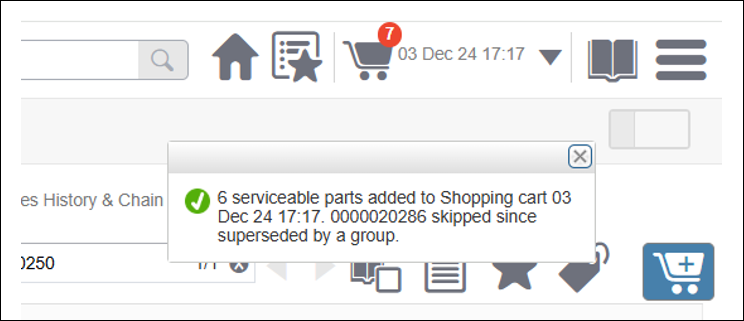
If a part having group supersession is added to a cart, an error message will be shown. You can open the supersession flyout for that particular part and add the individual parts from the group.

When com.ptc.sc.cart.excludeGroupPartFromCart is false
If Calculate and display a Preferred chain for a part preference is True, the system ensures only relevant parts are added.
If Calculate and display a Preferred chain for a part preference is False the behavior depends on user preference:
• Skip — Parts having supersession are entirely skipped.
• Requested — Adds all requested parts.
• Preferred — Adds all preferred parts.
For example:

Cross References
A cross referenced part is a part that is the same part, but might have a different name due to coming from another source or similar reasons.
If a part has one of more cross referenced parts, the Cross References link appears for the part:

In this case, part 000019491 cross references part BRPDL003B. Clicking on the cross referenced part opens the part information page for that part. If a part has a cross referenced part, the Cross References tab appears on that part’s information page:

Alternates
An alternate part is a part you can order instead of the part you are viewing. There is a one-to-one relationship between a part and its alternate part.
If a part has one of more alternate parts, the Alternates link appears in the part list for the part. Clicking that link opens the Alternates tab on the part information page:

You can order an alternate part from this tab. If your administrator has enabled the Show Inline Alternates preference, you can also view alternate part information in the parts list:
