Mapping Languages During Transform
Typically, the bundle specific data is expected in the en-US format. If there is any change to the English locale (such as en, en-GB, en-us, and so forth), then you must map this change to en-US. This also applies to other locales (such as pt-BR, es-XL, zh-TW, zh-CN, hi-IN, and so forth) supported in Arbortext Content Delivery. You can do this mapping either on the publishing side or in Arbortext Content Delivery.
For Arbortext Content Delivery, the mapping is done using a language mapping file. The file is named language-mapping.xml and is it located in the CONFIG/Applications/DataProcess/Config/Common/Templates/LanguageMappings folder. Following is an example of the file:
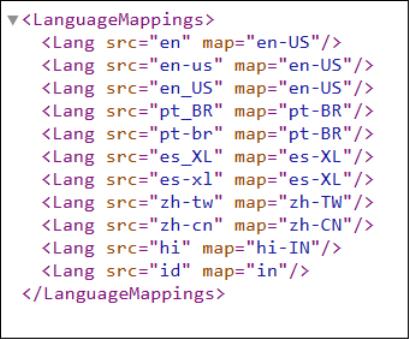
The example shows how you use the file to map the language present in the bundle along with its variants to the list of supported languages.
All of the mapped values are used in Identity Management (IMAN) for the LOCALE and AUTHORING_LOCALE specific attribute values. The mappings are also used in metadata generation for the xml:lang attribute associated with property values during transform.
Steps to Configure Language Synonyms
To load the multilingual bundles in sequence (Japanese after English), ensure consistent language code handling to avoid data loss. To configure the language synonyms, complete the following steps:
1. Browse to langSynonym.conf.xml file in this \InService\InS_SW\Config\System\Config location.
2. Add the synonym entry in langSynonym.conf.xml file.
Example for Japanese language:<lang code = "ja" synonym="ja-JP"/>
For example:

3. Save and close the file.
4. Restart Arbortext Content Delivery b .