Publish Topic Collection — Browser Considerations
Certain behaviors may be different depending on the browser that you are using.
Selecting Items in the TOC
- Internet ExplorerYou can select items in the TOC at the level of the first book icon
 that you can open. As a result, you can print larger collections of topics. You can print all the child topics under that
level.
In the example below, you can select the entire “Developing on ThingWorx Utilities” content category. You are able to print all of the child topics under the “Developing on ThingWorx Utilities” heading.
that you can open. As a result, you can print larger collections of topics. You can print all the child topics under that
level.
In the example below, you can select the entire “Developing on ThingWorx Utilities” content category. You are able to print all of the child topics under the “Developing on ThingWorx Utilities” heading.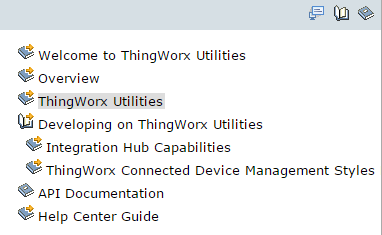
- FirefoxYou can select items at the level of the first expand topics icon
 that you can open. As a result, you must print smaller collections of topics. You can print all child topics under that level.
In the example below, you can select “Resource Providers.” You are able to print the range of topics from “Resource Providers” through “Example: Salesforce Resource Provider.”
that you can open. As a result, you must print smaller collections of topics. You can print all child topics under that level.
In the example below, you can select “Resource Providers.” You are able to print the range of topics from “Resource Providers” through “Example: Salesforce Resource Provider.”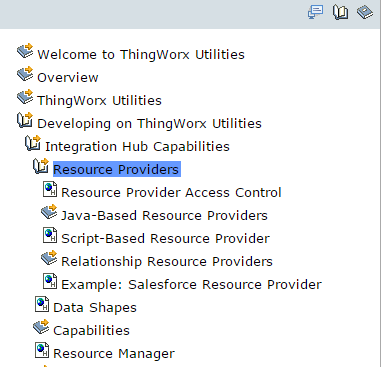
Printing From Print Preview
- Internet ExplorerThe TOC frame appears in the Print Preview window. You can deselect the TOC frame before you print.
- FirefoxThe Print Preview function does not work. Printing from the Print Preview window results in blank output.