Pro/User PROCESS for ASSEMBLIES Committee White Paper
PROCESS for ASSEMBLIES in a
DFT Manufacturing Environment
1/26/1999 - Version 1.0

1.0 Introduction/Background
This white paper documents the Pro/Process for Assemblies Technical Committee's views on how Pro/Process for Assemblies software functionality needs to be enhanced in order to support a DFT manufacturing environment. PTC customers who are creating DFT documentation and method sheets agree that Pro/Process for Assemblies does not have the flexibility or features to support a true DFT manufacturing environment.

2.0 Abstract/Business Case
The DFT manufacturing process requires two specific
documentation types upon which all other processes are built. The SOE [Sequence
of Events] describes the natural order of work performed to build a product in
a specific process. The OMS [Operational Method Sheet] is a "colored"
graphical representation of the quality criteria and work content as defined by
the sequence of events. The SOE and OMS use colored symbols for quality checks,
and different component colors for work content, verification, or test criteria
[Figure 1]. These colors are different from part parameters as assigned by the
designer. Furthermore DFT requires component find orders and component assembly
orders to be independent of part parameters and drawing table sort orders.
The implementation of Pro/Process for Assemblies
allows the creation of OMS's but not SOE's. However, for a company to use
Pro/Process for Assemblies method sheets in a DFT manufacturing environment
both documentation types must be combined. Therefore Pro/Process for Assemblies
needs to support the independent ordering of components during assembly step
creation and translate them to the drawing table. Pro/Process for Assemblies
also needs to allow the assigning of independent colors to assembled components
in the drawing, which may be different from the original part color parameters.
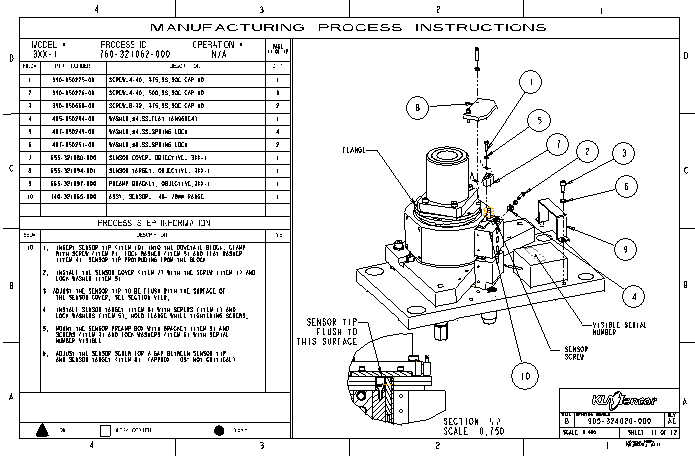
The current compromise employed is shown in Figure 2.

3.0 Problem
Statement
Currently the Process for assembly module does not support the Demand Flow Technology (DFT) manufacturing format. In order to do this, there are three specific areas of functionality that need to be addressed.
3.1 BOM index order
The first is the ability to sequence items within the BOM region in the order each item is assembled or any sequence that is desired. Upon attempting to change the index order for a repeat region of a Pro/Process drawing, Pro/Engineer currently lists the following error message: “Can not fix index due to symbol prs”.
3.2 Sub-steps
Secondly, each Pro/Process step is currently designed to document a single process step. This format necessitates the creation of a large number of both Process steps and drawing sheets. In practice, a set of related sub-steps must be placed in the description area on a single Pro/Process step as a work around in accordance to industry standards. The limitation is the ability to associate value and non-value time parameters to the sub-steps within the process description area and the ability to sum the columns of the sub-steps for each step and subsequently the whole process document.
3.3 Shaded images
Finally, DFT documentation combines text and illustrative instructions to form an assembly document. The DFT format calls for the use of color-coded, shaded images of assembly components. The color scheme is used to designate a component’s process state within a step (i.e. assembling, assembled, verify, etc). Currently Pro/Process does not support this function.
3.4 Enable importing of other images
The tool currently lacks the ability to put a JPEG image [or other image file type] on a sheet or sheets or include it on a sheet with a current exploded view.
4.0 Proposed Solution
4.1 BOM
index order
The BOM index issue could be resolved by enabling the use of the “Fix Index” function for Pro/Process repeat regions. In Drawing mode, under the menu path “DRAWING \ TABLE \ TBL REGIONS”, there is a function called “Fix Index”. This function enables a user to make changes to the assembly BOM index.
4.2 Sub-steps
A formal means of adding textual sub-steps to each Pro/Process step would solve this issue. A user can designate user-defined parameters, like time and cost, to each sub-step. This new format would enable a user to create a formatted display of each sub-step and their associated parameters in a repeat region. A Bill-of-Material format can be used to display a summation of numerical values, like time and cost, for every process sub-step, as well as for an entire assembly process.
4.3 Shaded
images
In order to satisfy this standard, Pro/Process should provide the ability to assign a process state to various component groups in each step through a color-coded scheme. In addition, the ability to include shaded images of components in a drawing should also be introduced as a new Drawing function.
4.4 Enable importing of other images
PTC should develop the capability to put a picture image of a cable end, fitting, glue applications, etc. in the drawing or close to a view so that it can be more descriptive.

5.0 Future Directions / Long Term Focus
Currently, many companies are entrenched with paper output as the solution. For DFT based manufacturing, this is the current and best practice to communicate method sheet drawings. In most cases, this methodology has worked well for years and will continue to work. However, it is understood that WEB enabled capabilities are rapidly becoming the common place.
Many industries are quickly changing their development and manufacturing practices to take advantage of some of the benefits the WEB can bring. Having the capabilities of viewing method sheets via the WEB is extremely encouraged. With this in mind, it is strongly suggested that current and enhanced capabilities for creating method sheets via Pro/Process for Assemblies not be done away with.
Many companies find it extremely difficult to change their current processes as rapidly as others do. Enhancing the current Pro/Process for Assemblies module to add needed capabilities for DFT manufacturing is strongly encouraged while also having the additional ability to migrate to WEB based method sheets would be very beneficial. This would allow many companies to continue with current methodologies and transition when ready or have companies that are ready for WEB enabled method sheets to start as soon as it is available. Furthermore, having the current Pro/Process for Assemblies capabilities enhanced to provide both paper output and WEB created method sheets, as a stand-alone module is extremely beneficial.

Appendices
Terms
DFT
- Demand Flow Technology based manufacturing system.
SOE
- Sequence of events: Defines the required work and quality criteria to build a
product in a specific production process. An SOE contains the natural sequence
of events required to produce a product to its product and process design
specification.
OMS
- Operational Method Sheets: A colored graphic representation of quality
criteria and work content as defined by the sequence of events. Graphically
illustrated sheets with little or no text that communicate to production
employees, simply and clearly, what the work content is at the operation, what
to verify and where to look to ensure Total Quality of previous operational work.
 Work content - The required work that is performed to
build a product to its specification. Includes setup, move, nonvalue,
value-added and quality work.
Work content - The required work that is performed to
build a product to its specification. Includes setup, move, nonvalue,
value-added and quality work.
Reference Documents:
Figure 1: Corel Draw template of an OMS
per DFT standards
Figure 2: ProProcess OMS format trying
to meet DFT standards

Authors
Doug Payne, NPI Mfg. Process Mgr. @ KLA-Tencor, 408-875-5425, [email protected]
Steve Fleming, Sr. NPI Mfg. Engineer @ KLA-Tencor, 408-875-5432, [email protected]
Chris Glasser, MCAD Mgr. @ KLA-Tencor, 408-875-5432, [email protected]
Eric Koda, MCAD Administrator @ KLA-Tencor, 408-875-5432, [email protected]