 |
|
|
Component Interfaces
You can setup and use Component Interfaces to rapidly assemble commonly used components. You can specify assembly references on the component, which will be selected automatically when assembling the component. |
|
| Task 3-4. Setup a Component Interface on the BOLT.PRT. |
- Select the Folder Browser
 , and click Working Directory , and click Working Directory  . .
|
|
|
IMPORTANT- In the next step, you will be opening a second Pro/ENGINEER window. You must resize and reposition the window to the right of the tutorial. |
|
- Double-click BOLT.PRT, select The Generic, and click Open.
- Click Edit > Setup from the main menu.
- Click Comp Interface from the menu manager.
- Change the constraint type from Mate to Insert, and select the cylindrical surface shown.
- Click Add, and then select the planar surface shown.
 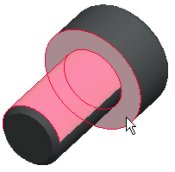
Selecting Insert and Mate Surfaces. |
- Click OK from the Component Interface dialog box.
- Click Window > Close
 to return to ENGINE.ASM. to return to ENGINE.ASM.
- Select on the textured area to the right of the browser to collapse it.
- Select the ENGINE_HEAD.PRT from the model tree, then press SHIFT and select the ENGINE_COVER.PRT.
- Right-click and select Resume.
|


 Previous


