부품 찾기
부품을 클릭하여 메타데이터를 볼 수 있을 뿐만 아니라 검색 창을 경험에 추가할 수 있습니다. 부품 번호가 있지만 모델에서 찾고 있는 정확한 부품을 모르는 경우 부품 번호를 검색하면 부품이 강조표시됩니다. 이는 findMeta라는 함수를 생성하여 수행되며 부품 번호를 입력하면 이를 쿼드콥터의 모델 데이터와 비교합니다. 그러면 해당 부품 번호를 가진 부품이 강조표시됩니다.
 |
이 섹션의 전체 코드와 사용자의 진행 상황을 비교하려면 GitHub의 Appendix 1에서 찾아볼 수 있습니다.
|
1. 홈 보기에서 2D 캔버스를 엽니다.
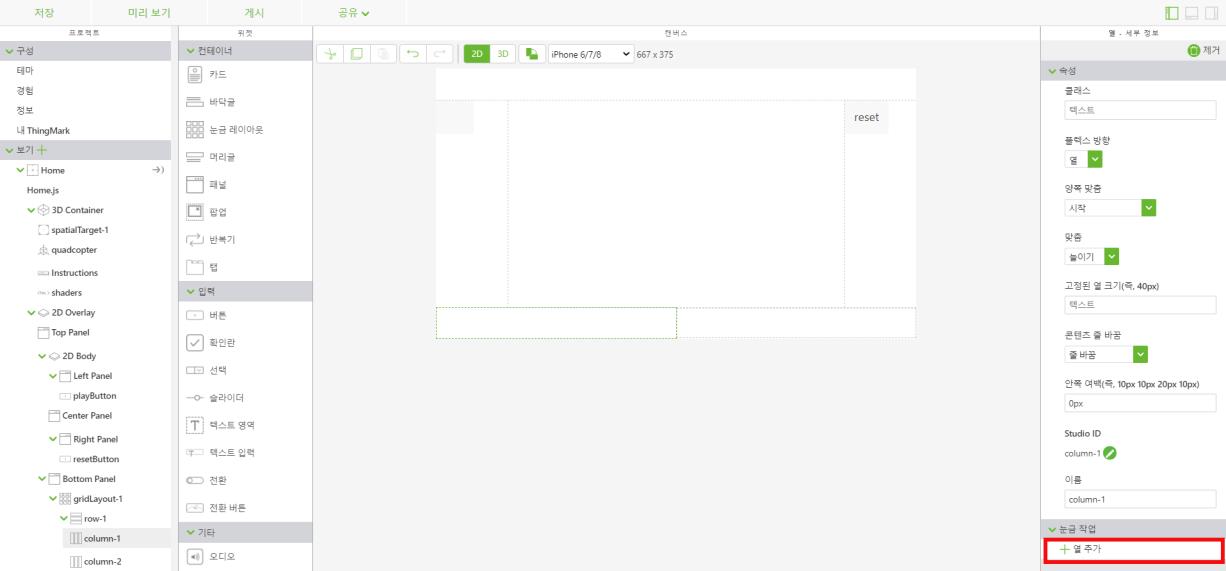
2. 눈금 레이아웃 위젯을 캔버스의 아래쪽 패널로 끌어서 놓습니다. 화면 왼쪽의 보기 트리에서 column-1을 클릭합니다. 아래쪽 패널을 두 개의 열로 분할하려면 눈금 작업 아래의 열 추가를 선택합니다.
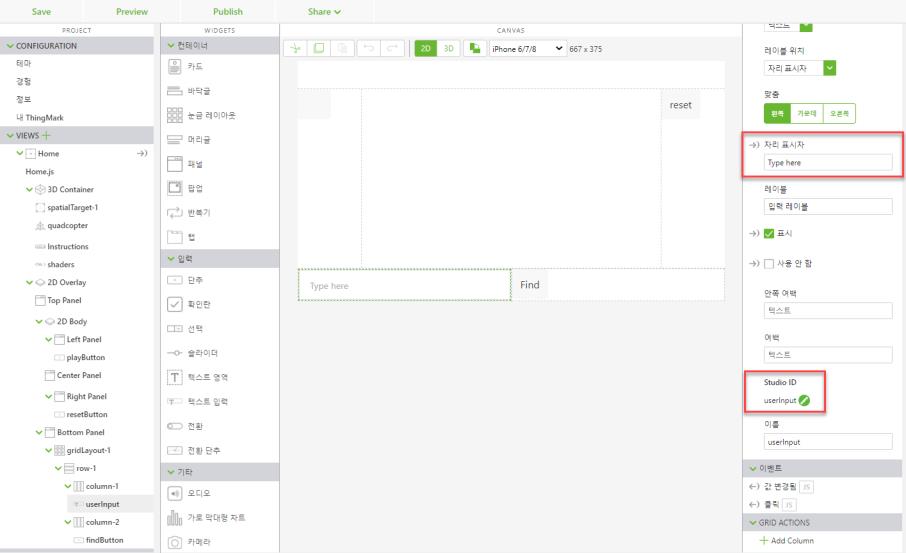
3. 텍스트 입력 위젯을 하단 패널의 column-1로 끌어서 놓습니다. 텍스트 입력은 부품 이름 또는 번호를 검색할 텍스트를 입력하는 데 사용됩니다. 자리 표시자 필드에 Type here를 입력합니다. Studio ID를 userinput으로 설정합니다.
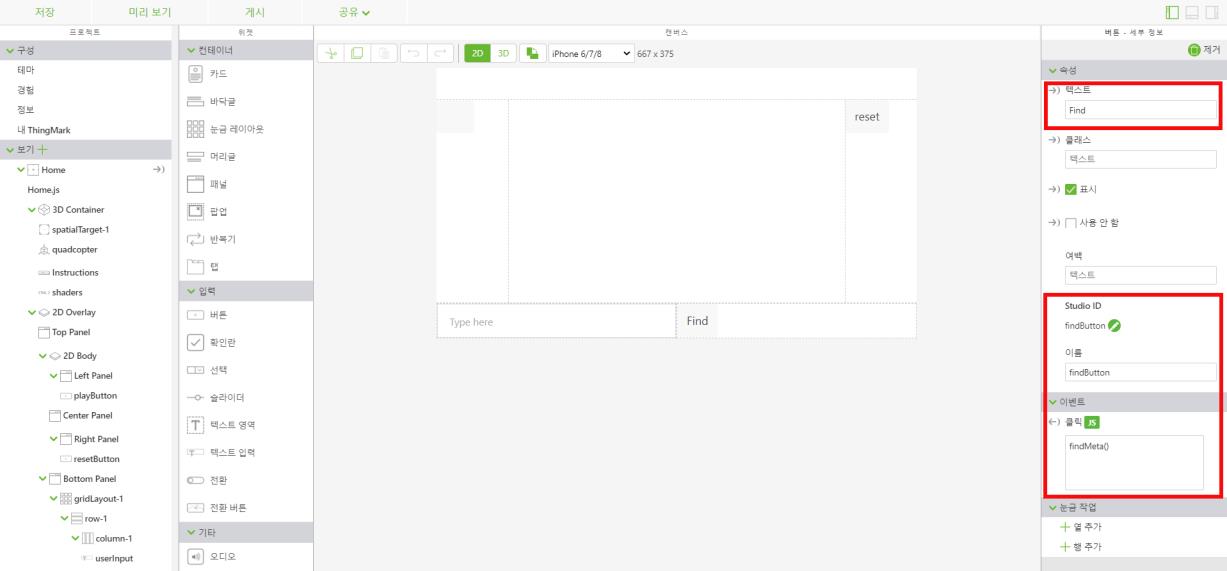
4. column-2에서 버튼 위젯을 추가합니다. 텍스트 필드에 Find를 입력합니다. Studio ID를 findButton으로 변경합니다. 클릭 이벤트의 JS 섹션에 findMeta()를 입력합니다. 이 함수는 Home.js 탭에서 생성됩니다.
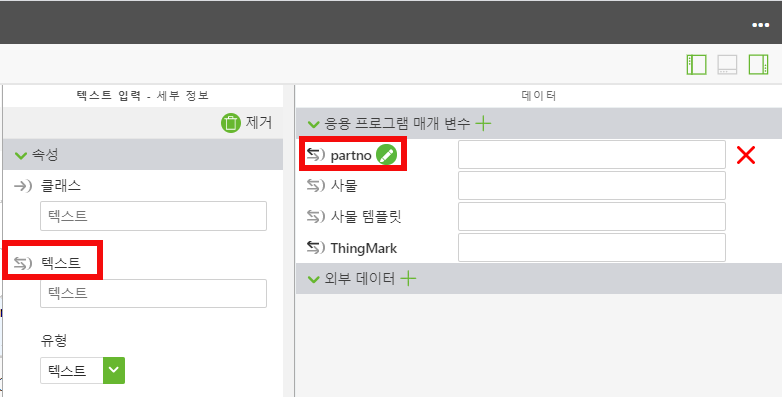
5. 오른쪽 상단 모서리(아래 표시)의  아이콘을 클릭하여 데이터 창을 엽니다. userInput 위젯에 입력된 텍스트를 모델 속성에 연결하려면 응용 프로그램 매개 변수를 생성해야 합니다.
아이콘을 클릭하여 데이터 창을 엽니다. userInput 위젯에 입력된 텍스트를 모델 속성에 연결하려면 응용 프로그램 매개 변수를 생성해야 합니다.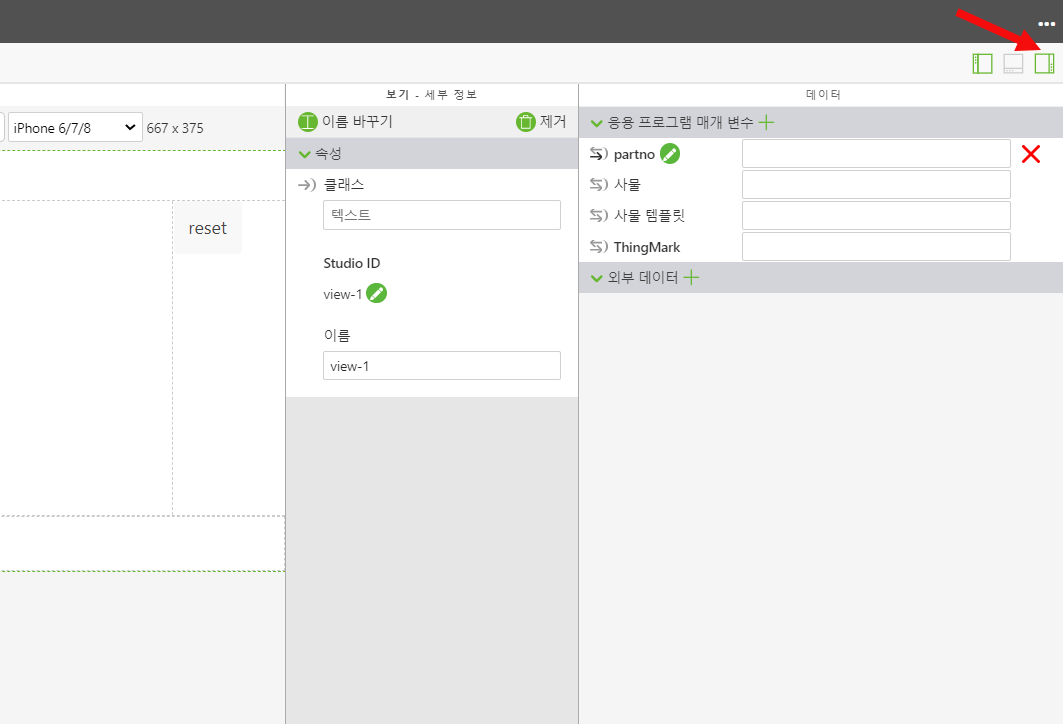
a. 응용 프로그램 매개 변수 옆의 녹색 + 기호를 선택하여 새 응용 프로그램 매개 변수를 생성합니다. 응용 프로그램 매개 변수의 이름을 partno로 지정하고 추가를 클릭합니다.
b. userInput 텍스트 입력 위젯을 엽니다. userInput 위젯의 텍스트 속성을partno 응용 프로그램 매개 변수로 끌어서 놓습니다. 그러면 partno 변수와 함께 userInput 상자에 입력된 텍스트가 바인딩됩니다. 두 개의 바인딩된 객체 옆에 있는 화살표가 검정으로 채워지면 바인딩이 성공적으로 생성된 것입니다.
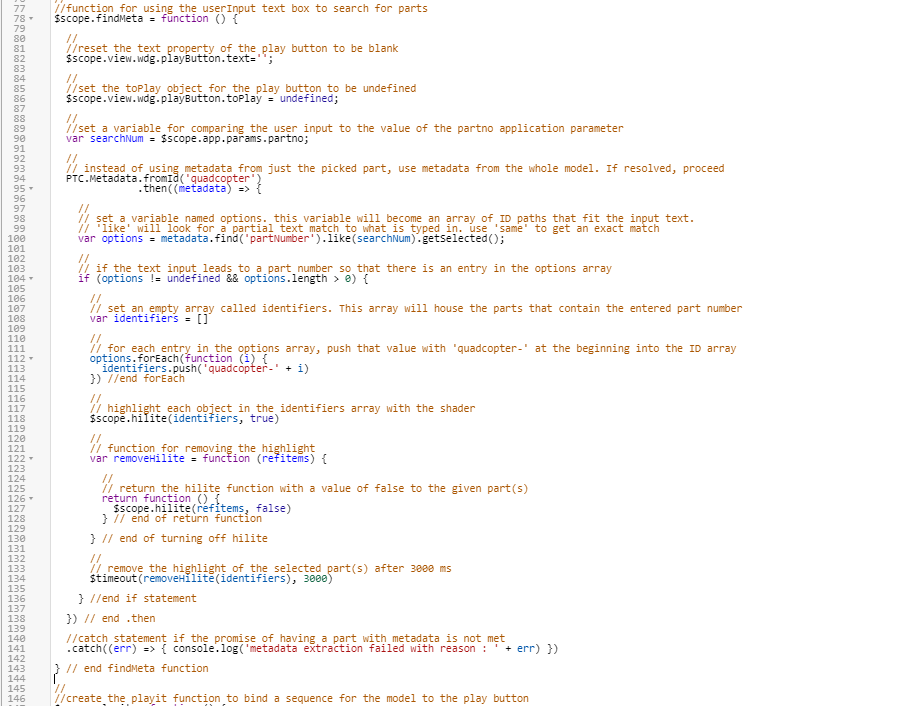
6. 보기 트리에서 Home.js를 클릭합니다. 해당 부품 번호의 부품을 찾기 위해 검색 창을 사용하려면 새로운 함수를 만들어야 합니다. 이 함수는 userInput 상자에 입력된 텍스트를 가져와서 이를 searchNum이라는 변수로 설정합니다. 이 값의 변수는 쿼드콥터 모델에서 사용 가능한 모든 부품 번호와 비교됩니다. 입력 텍스트와 일치하는 부품 번호의 부품이 있는 경우 해당 부품 또는 동일한 부품 번호의 인스턴스가 둘 이상 있는 부품은 이전 3D-Guided Service Instructions 201 섹션의 셰이더를 사용하여 강조표시됩니다. 부품이 3초 동안 강조표시됩니다. 이 함수를 userpick 함수가 끝난 후, playit 함수 전에 배치합니다.
1. userInput 텍스트 상자에 입력된 정보가 포함된 부품에서 메타데이터를 찾는 데 사용할 findMeta라는 함수를 만듭니다. 이 함수의 첫 번째 단계는 재생 버튼에서 텍스트를 제거하고 모든 시퀀스에서 모델을 연관해제하는 것입니다. 이제 생성된 응용 프로그램 매개 변수를 기반으로 userInput 텍스트 상자에 입력된 텍스트와 동일한 값을 갖도록 변수를 만들어야 합니다.
//function for using the userInput text box to search for parts
$scope.findMeta = function () {

  //reset the text property of the play button to be blank
  $scope.view.wdg.playButton.text='';
  //
  //set the toPlay object for the play button to be undefined
  $scope.view.wdg.playButton.toPlay = undefined;
  //
  //set a variable for comparing the user input to the value of the partno application parameter
  var searchNum = $scope.app.params.partno;

  //
  // instead of using metadata from just the picked part, use metadata from the whole model. If resolved, proceed
  PTC.Metadata.fromId('quadcopter')
                      .then ( (metadata) => {
2. 함수의 다음 섹션에서는 userInput에 입력된 데이터를 가져와서 모델의 Part Number 속성과 비교합니다. options 변수는 입력된 텍스트에 해당하는 데이터를 포함하는 ID 경로의 배열로 생성됩니다. 이는 .find 및 .like 메서드를 함께 사용하여 수행됩니다. 사용자가 userInput 상자에 텍스트를 입력하면 이는 텍스트 입력과 매개 변수 간의 바인딩으로 인해 partno 응용 프로그램 매개 변수에 입력됩니다. 이로 인해 searchNum 변수가 partno 응용 프로그램 매개 변수의 값으로 설정됩니다. 그러면 .find 메서드를 사용하여 모델 속성에 대한 기존 partNumber 값을 찾아 searchNum 변수와 비교합니다. 그런 다음 .like 메서드를 사용하여 입력 상자에 입력된 텍스트와 부분적으로 또는 정확히 일치하는 모든 부품 번호를 찾습니다. 이러한 결과는 getSelected로 인해 options 변수에 값 목록으로 저장됩니다.
  //
  //set a variable for comparing the user input to the value of the partno application parameter
  var searchNum = $scope.app.params.partno;
  //
  // instead of using metadata from just the picked part, use metadata from the whole model. If resolved, proceed
  PTC.Metadata.fromId('quadcopter')
    .then((metadata) => {
        //
        // set a variable named options. this variable will become an array of ID paths that fit the input text.
        // 'like' will look for a partial text match to what is typed in. use 'same' to get an exact match
        var options = metadata.find('partNumber').like(searchNum).getSelected();
        //
        // if the text input leads to a part number so that there is an entry in the options array
        if (options != undefined && options.length > 0) {
            //
            // set an empty array called ID. This array will house the parts that contain the entered part number
            var identifiers = []
            //
            // for each entry in the options array, push that value with 'quadcopter-' at the beginning into the ID array
            options.forEach(function (i) {
                identifiers.push('quadcopter-' + i)
            }) //end forEach
            //
            // highlight each object in the identifiers array with the shader
            $scope.hilite(identifiers, true)
            //
            // function for removing the highlight
            var removeHilite = function (refitems) {
                //
                // return the hilite function with a value of false to the given part(s)
                return function () {
                    $scope.hilite(refitems, false)
                } // end of return function
            } // end of turning off hilite
            //
            // remove the highlight of the selected part(s) after 3000 ms
            $timeout(removeHilite(identifiers), 3000)
          } //end if statement
    }) // end .then
      //catch statement if the promise of having a part with metadata is not met
      .catch((err) => { console.log('metadata extraction failed with reason : ' + err) })
} // end findMeta function
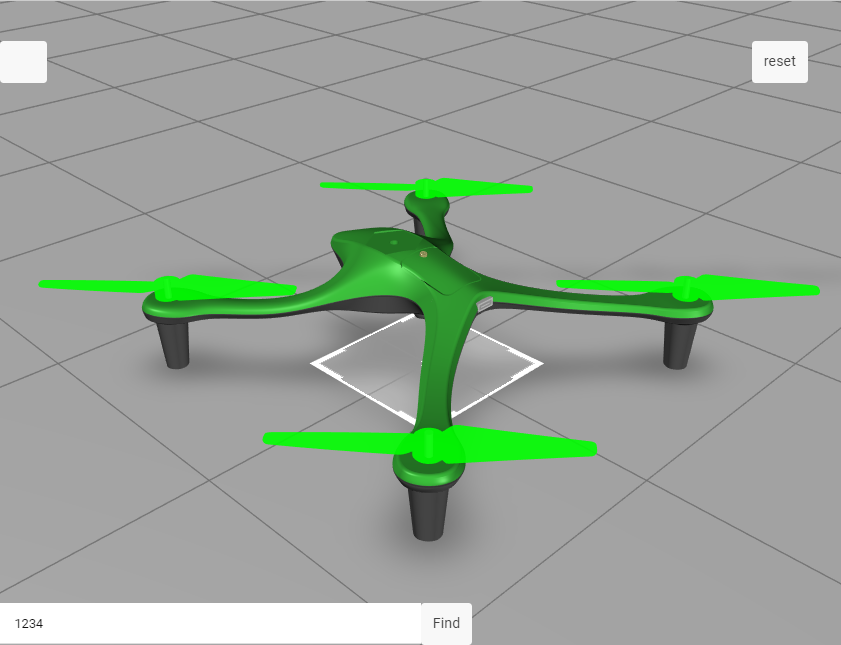
7. 미리 보기를 클릭합니다. userInput 상자에 1234를 입력하고 Find를 클릭합니다. 모든 로터가 녹색으로 강조표시되었다가 사라지면 이 단계가 성공적으로 완료된 것입니다.
이 섹션의 전체 코드는 GitHub의 3D-Guided Service Instructions 202에서 찾을 수 있습니다.
3D-Guided Service Instructions 301에서는 모델에 가격 데이터 및 쇼핑 카트 추가 방법을 살펴보겠습니다.