모델에서 팝업에 속성 추가
Ionic 팝업이 성공적으로 생성되면 Creo Illustrate에서 모델에 대해 생성된 속성 메타데이터를 이 프로젝트의 3D-Guided Service Instructions 101 부분에 추가할 수 있습니다. 이는 현재 Vuforia Studio 버전 8.5.13 이상에 포함된 PTC Metadata API를 사용하여 수행됩니다.
 |
이 섹션의 전체 코드와 사용자의 진행 상황을 비교하려면 GitHub의 Appendix 5에서 찾아볼 수 있습니다.
|
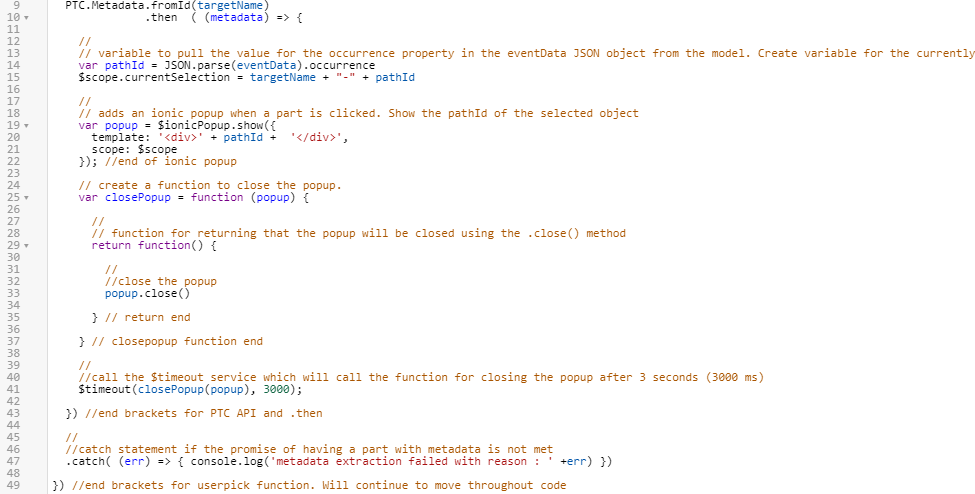
1. PTC Metadata API를 사용하여 모델의 JSON 데이터에서 속성을 호출합니다. 이 버전의 API는 모델에 대한 메타데이터가 있는 경우 콜백 함수를 사용하여 데이터를 읽어들이는 .then 메서드를 사용합니다.
1. Home.js로 이동하고 userpick 함수:
//
//Look at model and see if it has metadata. If it does, then execute the below code and create an object called metadata
  PTC.Metadata.fromId(targetName)
              .then  ( (metadata) => {
바로 아래 다음 코드를 추가합니다.
 |
단계 c에서 닫는 대괄호가 추가될 때까지 오류 메시지가 나타납니다.
|
2. 12에서 41까지의 라인을 선택하고 들여쓰기 버튼을 클릭하여 들여씁니다. 이러한 라인은 프라미스 성공에 의존하므로 위의 PTC API 내부에 배치됩니다.

3. 다음 코드를 라인 43에 추가하여 PTC API 함수에 닫는 대괄호를 추가합니다. 이를 통해 오류나 완료되지 않은 라인이 없음을 확인합니다.
  }) //end brackets for PTC API and .then
  //
  //catch statement if the promise of having a part with metadata is not met
  .catch( (err) => { console.log('metadata extraction failed with reason : ' +err) })
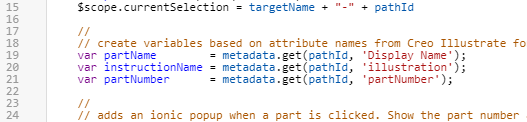
2. 메타데이터 속성에서 데이터를 찾으려면 PTC Metadata API에 대한 get 함수가 필요합니다. metadata.get 함수를 호출하면 모델에 대한 모든 메타데이터를 읽어들이며 이 경우 모델은 Creo Illustrate에 추가된 부품의 속성으로 구성됩니다. pathID 변수(부품의 발생 데이터 포함)를 사용하면 metadata.get 함수가 선택한 부품에 대한 데이터를 색인합니다. 메타데이터 API 함수의 전체 목록은 경험에 CAD 메타데이터 통합항목을 참조하십시오. 이 함수는 다음 변수에 대한 값을 얻는 데 사용됩니다.
◦ 부품의 표시 이름
◦ 지시 이름
◦ 부품 번호
$scope.currentSelection 변수:
    //
    // create variables based on attribute names from Creo Illustrate for this model. use metadata.get to obtain the data from the JSON properties for this occurrence.
    var partName        = metadata.get(pathId, 'Display Name');
    var instructionName = metadata.get(pathId, 'illustration');
    var partNumber      = metadata.get(pathId, 'partNumber');
아래 다음 코드 추가
3. 팝업의 template 속성에 대한 정의를 변경합니다. 이제 Vuforia Studio에 속성 데이터를 가져왔으므로 클릭하면 Ionic 팝업에 partNumber 및 partName 변수 값이 표시됩니다. 추가 정보를 포함하도록 다음과 같이 설명도 편집합니다.
//
// adds an ionic popup when a part is clicked. Show the part number and name of the selected object. </br> adds a line break between the two variables
var popup = $ionicPopup.show({
template: '<div>' + partNumber + ' </br>' + partName + '</div>',
scope: $scope
}); //end of ionic popup

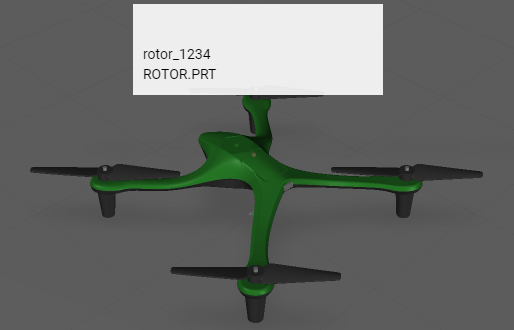
4. 저장을 클릭하고 미리 보기를 열어 새로운 정보가 팝업에 추가되었는지 확인합니다. 이미지가 아래와 같으면 이 단계가 올바르게 완료된 것입니다.
5. 다음 섹션에서는 재생 및 재설정 버튼 생성 및 바인딩 방법을 살펴보겠습니다.